• Major browser differences

    From Robert Baer@robertbaer@localnet.com to alt.computer on Thu Feb 18 12:09:37 2021
    This is the specifics of the first time i encountered this problem
    due to menu choices NOT seen when referring to a received letter.
    Win 7.1 OS, desktop computer, not to be confused with a so-called smartphone.

    Using Firefox 80.0.1:
    Log into Humana.com, see a bar "myhmana", then a menu bar
    (house icon)Home, (bell icon)Mesages, (spyglass icon)I want to.., Menu(down arrow)

    Using Google Chrome 84.0:
    Log into Humana.com, see a bar "myhmana", (square cluster of dots),
    More Humana then a menu bar
    (house icon), Coverage(down arrow), Claims(down arrow),
    MyHeath(down arrow), Billing, (bell icon), (typical person icon)Account

    Major differences.

    What the heck? Firefox that buggy?
    Repairs/upgrades available?

    Thanks


    --- Synchronet 3.20a-Win32 NewsLink 1.114
  • From JJ@jj4public@gmail.com to alt.computer on Fri Feb 19 15:31:22 2021
    On Thu, 18 Feb 2021 12:09:37 -0800, Robert Baer wrote:
    This is the specifics of the first time i encountered this problem
    due to menu choices NOT seen when referring to a received letter.
    Win 7.1 OS, desktop computer, not to be confused with a so-called smartphone.

    Using Firefox 80.0.1:
    Log into Humana.com, see a bar "myhmana", then a menu bar
    (house icon)Home, (bell icon)Mesages, (spyglass icon)I want to.., Menu(down arrow)

    Using Google Chrome 84.0:
    Log into Humana.com, see a bar "myhmana", (square cluster of dots),
    More Humana then a menu bar
    (house icon), Coverage(down arrow), Claims(down arrow),
    MyHeath(down arrow), Billing, (bell icon), (typical person icon)Account

    Major differences.

    What the heck? Firefox that buggy?
    Repairs/upgrades available?

    Thanks

    I highly doubt it's because of buggy Firefox. I't likely that the menu don't appear in Firefox because they point to pages whose content functionalities requires either new web standard features which haven't been implemented by Firefox.

    FYI, Chrome is an (aggresive) early adopter of new web standard features including those which are still work in progress (which may still change in the future).

    Depending on the required features which are not yet available in Firefox (what they do, and how), they may be emulated using GM script which
    basically work like a (client side) patch for a website.
    --- Synchronet 3.20a-Win32 NewsLink 1.114
  • From VanguardLH@V@nguard.LH to alt.computer on Fri Feb 19 03:44:11 2021
    Robert Baer <robertbaer@localnet.com> wrote:

    This is the specifics of the first time i encountered this problem
    due to menu choices NOT seen when referring to a received letter.
    Win 7.1 OS, desktop computer, not to be confused with a so-called smartphone.

    Using Firefox 80.0.1:
    Log into Humana.com, see a bar "myhmana", then a menu bar
    (house icon)Home, (bell icon)Mesages, (spyglass icon)I want to.., Menu(down arrow)

    Using Google Chrome 84.0:
    Log into Humana.com, see a bar "myhmana", (square cluster of dots),
    More Humana then a menu bar
    (house icon), Coverage(down arrow), Claims(down arrow),
    MyHeath(down arrow), Billing, (bell icon), (typical person icon)Account

    Major differences.

    What the heck? Firefox that buggy?
    Repairs/upgrades available?

    Thanks

    What happens when you make the window size the same for each web
    browser, so they don't have to use a different layout when the window
    isn't large enough?

    Upload screenshots (with any user info obscured or blurred out) to
    online pic storage, and give the URLs to the uploaded screenshots, so
    *we* can see what you see since your description is hard to follow.
    --- Synchronet 3.20a-Win32 NewsLink 1.114
  • From Paul@nospam@needed.invalid to alt.computer on Fri Feb 19 10:00:13 2021
    Robert Baer wrote:
    This is the specifics of the first time i encountered this problem due
    to menu choices NOT seen when referring to a received letter.
    Win 7.1 OS, desktop computer, not to be confused with a so-called smartphone.

    Using Firefox 80.0.1:
    Log into Humana.com, see a bar "myhmana", then a menu bar
    (house icon)Home, (bell icon)Mesages, (spyglass icon)I want to.., Menu(down arrow)

    Using Google Chrome 84.0:
    Log into Humana.com, see a bar "myhmana", (square cluster of dots),
    More Humana then a menu bar
    (house icon), Coverage(down arrow), Claims(down arrow), MyHeath(down arrow), Billing, (bell icon), (typical person icon)Account

    Major differences.

    What the heck? Firefox that buggy?
    Repairs/upgrades available?

    Thanks

    https://www.humana.com/legal/site-system-requirements

    Desktop

    Microsoft Edge (latest) <=== no distinction, MSEdge versus ChromEdge
    Mozilla Firefox (latest)
    Google Chrome (latest)
    Safari - Safari (latest)

    Your difference in descriptions implies you did not
    successfully authenticate. Since "Coverage" and "Claims"
    are missing, it's like they have not connected to your
    file after logging in.

    The operating system provides the SChannel for security setup.
    It's unlikely that two browsers, sitting on the same OS,
    received a different SChannel response.

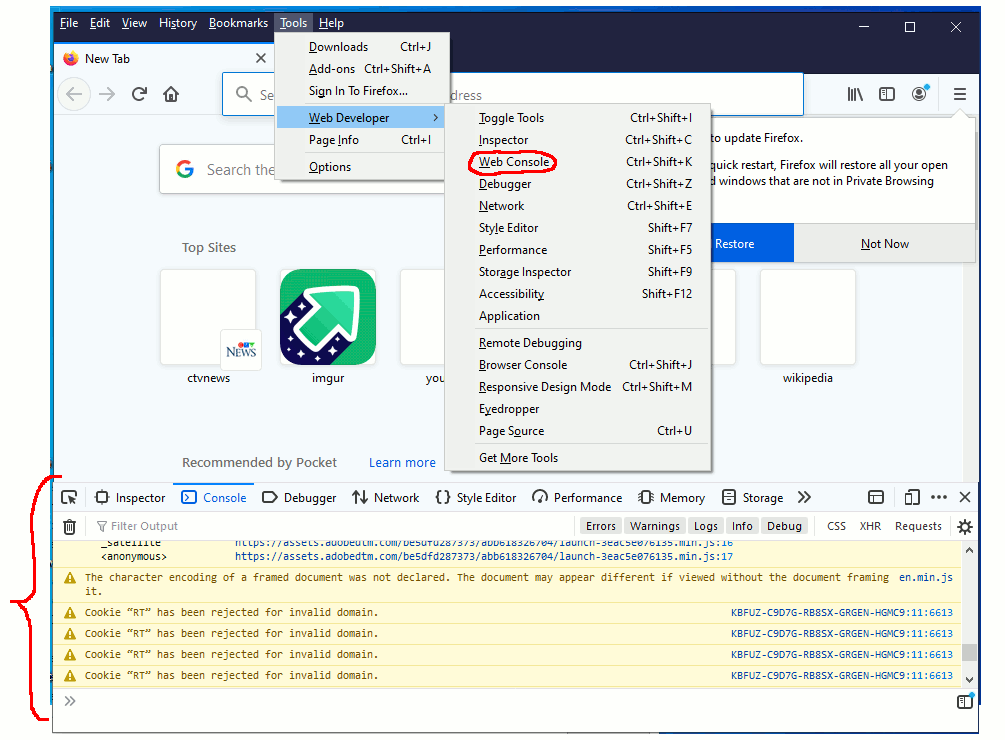
    Firefox should have something like a Dev Tools : Error Console.
    I would check for any messages regarding authentication.

    ctrl-shift-K

    https://i.postimg.cc/fWFhM57B/FF-web-console.gif

    Paul

    --- Synchronet 3.20a-Win32 NewsLink 1.114
  • From Robert Baer@robertbaer@localnet.com to alt.computer on Sat Feb 20 01:01:26 2021
    Paul wrote:
    Robert Baer wrote:
      This is the specifics of the first time i encountered this problem
    due to menu choices NOT seen when referring to a received letter.
      Win 7.1 OS, desktop computer, not to be confused with a so-called
    smartphone.

      Using Firefox 80.0.1:
      Log into Humana.com, see a bar "myhmana", then a menu bar
        (house icon)Home, (bell icon)Mesages, (spyglass icon)I want to..,
    Menu(down arrow)

      Using Google Chrome 84.0:
      Log into Humana.com, see a bar "myhmana", (square cluster of dots),
    More Humana then a menu bar
        (house icon), Coverage(down arrow), Claims(down arrow),
    MyHeath(down arrow), Billing, (bell icon), (typical person icon)Account

      Major differences.

      What the heck? Firefox that buggy?
      Repairs/upgrades available?

      Thanks

    https://www.humana.com/legal/site-system-requirements

       Desktop

         Microsoft Edge (latest)   <=== no distinction, MSEdge versus ChromEdge
         Mozilla Firefox (latest)
    [] link given from latest Mozilla Firefox gave download, "Firefox Installer.exe" was same 18.5.0.0 as i have installed.
    So Moz has not caught up with what Humana actually did.

         Google Chrome (latest)
         Safari - Safari (latest)

    Your difference in descriptions implies you did not
    successfully authenticate. Since "Coverage" and "Claims"
    are missing, it's like they have not connected to your
    file after logging in.

    The operating system provides the SChannel for security setup.
    It's unlikely that two browsers, sitting on the same OS,
    received a different SChannel response.

    Firefox should have something like a Dev Tools : Error Console.
    I would check for any messages regarding authentication.

       ctrl-shift-K

    https://i.postimg.cc/fWFhM57B/FF-web-console.gif

       Paul


    --- Synchronet 3.20a-Win32 NewsLink 1.114
  • From VanguardLH@V@nguard.LH to alt.computer on Sat Feb 20 11:17:21 2021
    Robert Baer <robertbaer@localnet.com> wrote:

    Paul wrote:

    https://www.humana.com/legal/site-system-requirements

    áááá Mozilla Firefox (latest)

    link given from latest Mozilla Firefox gave download, "Firefox Installer.exe" was same 18.5.0.0 as i have installed.
    So Moz has not caught up with what Humana actually did.

    Presumably you had a typo in the version, like 18.5.0.0 was supposed to
    be 85.0.0. Version 18 was released back in Jan 2013.

    You said you were using Firefox 80.0.1. The latest version is 85.0.2.
    Between those 2 versions, the changes were (and omitting changes for
    Android since you mention using Windows 7):

    FF v80:
    - Setting for the default system PDF viewer.
    - New add-ons blocklist enabled to improve performance and scalability.
    - Support for RTX and Transport-cc for improved call quality in poor
    network conditions and better bandwidth estimation and better
    compatibility with many websites using WebRTC (desktop).

    Since you aren't downloading to view a .pdf file, that change is
    irrelevant.

    Changes for VOIP calls doesn't apply; however, if you disabled WebRTC,
    some sites won't work. For example, Google Voice just sits on the next
    page after logon with an ever-spinning cursor, but the page doesn't get
    loaded.

    Firefox has had its own internal blacklist (content blocking) since
    version 70, now called Enhanced Tracking Protection, which can interfere
    with some sites. After all, blacklists block some content which can
    break web pages. They use the Disconnect.me blacklist which is small,
    and has little impact on preventing tracking or unwanted content, but
    can impact a site that the built-in blacklist happens to target. As I
    recall, an icon appears in the addressbar indicating some content got
    blocked. Click on the shield icon at the left of the addressbar to see
    what content, if any, got blocked. Of course, if you installed an
    adblocker add-on, and since its blacklist(s) are far more extensive,
    those could be blocking content at the web site.

    FF v81:
    - Ability to pause or play audio or video right from the keyboard or
    headset.
    - Introduction of the Alpenglow theme.
    - Ability to save, manage, and auto-fill credit card information for
    U.S. and Canada users.
    - Support of Acroform, which allows users to fill in, print, and save
    supported PDF forms.
    - Automatic revelation of the Bookmarks toolbar.
    - Axpansion of .xml, .svg, and .webp; and fixes for browser native HTML5
    audio/video controls.

    I don't see any of those affecting your Humana login.

    FF v82:
    - Several improvements that make watching videos more delightful.
    - Improved performance on both page loads and start up time.
    - Aaving a webpage to Pocket from the Firefox toolbar
    - Automatically purge cookies from sites not visited in 30 days.

    You didn't mention if you are allowing cookies to get saved across web
    browser sessions. Firefox has settings to purge all locally cached data
    on its exit. Chrome does not, so you need to add an add-on (e.g., Click
    & Clean) to purge locally cached data (which is actually queued for when
    Chrome next loads, not when Chrome exits). I configure Firefox to purge everything on its exit. I had to use Click&Clean with Chrome to effect
    the same cleanup after a web session. Since Chromium Edge (C-Edge) uses
    the Chromium rendering engine and Google's V8 Javascript engine, and
    because C-Edge can be configured to be more secure than Chrome, I moved
    to C-Edge. Edge has settings to purge local data on its exit, something
    that is missing in Chrome.

    FF v83:
    - Updates to SpiderMonkey and JavaScript engine and replacement of the
    part of the JavaScript engine that helps to compile and display
    websites for the user.
    - Introduction of the HTTPS-Only Mode.
    - Support of pinch zooming for users with Windows touchscreen devices
    and touchpads on Mac devices.
    - Support of keyboard shortcuts for fast forwarding and rewinding videos
    in Picture-in-Picture.
    - Improved user interface.
    - Improved functionality and design for a number of Firefox search
    features.
    - Support of Acroform.

    HTTPS-only mode is just blocking of connects to HTTP content to make
    sure all content is secure or, at least, that the cert validates from
    where the content came from. Changes to chrome (small "c") won't affect
    how web documents get rendered. Zooming isn't your problem. You aren't
    doing searching within the web document, and forms isn't your problem.

    Changing the Javascript engine could effect the execution of scripts in
    web pages delivered by the server.

    FF v84:
    - Native support for macOS devices built with Apple Silicon CPUs.
    - Rollout of WebRender to MacOS Big Sur, Windows devices with Intel Gen
    6 GPUs, and Intel laptops running Windows 7 and 8, and an accelerated
    rendering pipeline for Linux/GNOME/X11 users for the first time.
    - Use of more modern techniques for allocating shared memory on Linux,
    improving performance and increasing compatibility with Docker
    - Option to view open tabs side by side in a grid view.
    - Ability to delete downloaded files within the app.
    - Rollout of WebRender to more users on the Mali-G GPU series.

    You probably already have had WebRender enabled for quite a while.
    Changes for Macs and Linux are irrelevant to your use on Windows.
    Changes to the chrome (tabbing) have no effect on how the web document
    looks.

    FF v85:
    - Protection from supercookies, a type of tracker that can stay hidden
    in the browser and track users online, even after they have cleared
    cookies.
    - Ability to save and access bookmarks more easily.
    - Ability of the password manager to have users remove all their saved
    logins with one click, as opposed to having to delete each login
    individually.
    - Removal of Adobe Flash support.
    - Added support for the :focus-visible pseudo class.

    The adding tracking protection is already offered if you configure
    Firefox to purge EVERYTHING on its exit. Humana should not be using
    Adobe Flash. Reusing saving logins means you might be automatically
    logging it when you visit a site although usually you just get to select
    which login to use. Only by looking at the web document delivered to
    Firefox by the server and the web document delivered by the server when
    you use Chrome to connect to it would allow inspection of the code to
    see if the Humana site decided to use the :focus-visible class.

    I don't know what you were using for a version of Firefox where the
    Humana page apparently was the same as what you saw in Chrome, so no
    point to analyze what changes were made to Firefox between what you used
    when it was okay to version 80 that you have now. Doesn't seem any
    reason for you to not update to FF v85 to check if the problem
    disappears. Since there were changes to the Javascript engine in
    Firefox, could be Humana was using script that Chrome understands better
    than the older v80 of Firefox does.

    As for the difference in icons presented in the web pages, the server
    decides which to include in a web document. Could be Humana uses a
    different icon based on the web client that connects to their server.
    Could be you aren't getting the same font set from the server,
    especially since settings in Firefox can block web fonts because those
    can let Google track you: a site delivers fonts from Google, and Google delivers those fonts to your client, so Google (or any web font foundary
    used by a site, like Monofont) can track your client getting their
    fonts. Disabling web fonts in the client can make the web page
    difficult to use, like not knowing some gibberish means means to move
    forward or backward or means to hit Enter. Too many web designers want
    to revert to hieroglyphics (icons) instead of using text.

    You didn't mention the list of add-ons you have installed in Firefox,
    and those installed in Chrome. If any are adblockers, and if you use
    the same one in each web browser, they may be configured differently
    between the web browsers, like using different blacklists.

    Humama.com using Firefox:
    __ Login
    \__ See a navbar named "myhmana" (no mention if you use it).
    \__ See a menu (a navbar, frame, popup, what?) with:
    Home (house icon)
    Messages (bell icon)
    I want to ... (spyglass icon presumably for drop-down list)
    Another menu or submenu (down-arrow icon)

    Humana.com using Chrome:
    __ Login
    \__ See a navbar named "myhmana" (no mention if you us it).
    \__ See a menu (navbar, frame, popup, what?) with:
    ? (house icon)
    Coverage (down-arrow)
    Claims (down-arrow)
    MyHealth (down-arrow)
    Billing (bell icon?)
    Account (person icon)

    Since those web pages are scripted, my guess is different web clients
    are offered different scripts. Complain to Humana for delivering
    different content based on which web client connects to them. I don't
    have a Humana account to do the login to see the code for the ensuing
    web page after login to compare between what Firefox received and what
    Chrome received. For the home page that I see before login, they look
    the same in Firefox and C-Edge (which I used instead of Chrome since
    C-Edge uses the Chromium rendering engine and V8 Javascript engine),
    even when I squeeze the window width to its minimum for each web
    browser. I do notice when shrinking the width is the top navbar keeps
    the Humana menu button, but the Shop For Plans and Member Resources
    links disappear because there isn't enough room to display them.
    Instead of trying to wrap them around (and have menus oblitering other
    menus), they get dropped from the navbar. That's why I asked if the
    fonts and web document width is the same for both web browsers.

    Are the font sizes the same within the document window for both web
    browsers? Larger fonts in one means everything gets wider, and you'll
    need a wider window to show the same content. If the fonts are the same
    size, are the windows for Firefox and Chrome the same size? If not, the smaller one will either have to horizontall scroll the content, wrap it,
    or provide a means of accessing the content that is outside the window.

    In Firefox, if you click on "I want to ...", do you see the other menu
    choices you see in Chrome (Coverage, Claims, MyHealth, Billing, and
    Account)?

    --- Synchronet 3.20a-Win32 NewsLink 1.114
  • From VanguardLH@V@nguard.LH to alt.computer on Sat Feb 20 11:32:29 2021
    VanguardLH <V@nguard.LH> wrote:

    That's why I asked if the
    fonts and web document width is the same for both web browsers.

    Oops, also forget to have you check the zoom level is the same, like
    100%, in both web browsers. Firefox can save site preferences which
    includes the zoom level. I don't have Chrome to check if it saves the
    zoom level between web browser sessions.
    --- Synchronet 3.20a-Win32 NewsLink 1.114
  • From Robert Baer@robertbaer@localnet.com to alt.computer on Mon Feb 22 19:23:30 2021
    Paul wrote:
    Robert Baer wrote:
      This is the specifics of the first time i encountered this problem
    due to menu choices NOT seen when referring to a received letter.
      Win 7.1 OS, desktop computer, not to be confused with a so-called
    smartphone.

      Using Firefox 80.0.1:
      Log into Humana.com, see a bar "myhmana", then a menu bar
        (house icon)Home, (bell icon)Mesages, (spyglass icon)I want to..,
    Menu(down arrow)

      Using Google Chrome 84.0:
      Log into Humana.com, see a bar "myhmana", (square cluster of dots),
    More Humana then a menu bar
        (house icon), Coverage(down arrow), Claims(down arrow),
    MyHeath(down arrow), Billing, (bell icon), (typical person icon)Account

      Major differences.

      What the heck? Firefox that buggy?
      Repairs/upgrades available?

      Thanks

    https://www.humana.com/legal/site-system-requirements

       Desktop

         Microsoft Edge (latest)   <=== no distinction, MSEdge versus ChromEdge
         Mozilla Firefox (latest)
         Google Chrome (latest)
         Safari - Safari (latest)

    Your difference in descriptions implies you did not
    successfully authenticate. Since "Coverage" and "Claims"
    are missing, it's like they have not connected to your
    file after logging in.

    The operating system provides the SChannel for security setup.
    It's unlikely that two browsers, sitting on the same OS,
    received a different SChannel response.

    Firefox should have something like a Dev Tools : Error Console.
    I would check for any messages regarding authentication.

       ctrl-shift-K

    https://i.postimg.cc/fWFhM57B/FF-web-console.gif

       Paul

    Now that i have some time to fiddle this, Google Chrome works
    DIFFERENTLY than before; i see exactly the same screen that Firefox shows.

    In this pass, i did something differently - namely i cleared the
    cache in Google Chrome first.

    This is way above my pay grade; i quit on this. As long as i can get
    what i need and order what need, i will ignore this absolute consistency.

    Thanks


    --- Synchronet 3.20a-Win32 NewsLink 1.114
  • From VanguardLH@V@nguard.LH to alt.computer on Tue Feb 23 07:14:38 2021
    Robert Baer <robertbaer@localnet.com> wrote:

    Now that i have some time to fiddle this, Google Chrome works
    DIFFERENTLY than before; i see exactly the same screen that Firefox
    shows. In this pass, i did something differently - namely i cleared
    the cache in Google Chrome first.

    So, the site changed, but the web browser didn't notice the change, and
    instead offered its cached version. Clients trying to detect when a web
    site changes its content is still rather iffy, and why I don't rely on
    the guessing algorithm. In each web browser session, I have the web
    browser get a fresh copy of a web page. During a web session, and
    because I do /not/ leave the web browser running continuously, I
    configure the web browser (or an add-on if the feature is missing in the
    web browser) to purge all its locally cached data: cookies, DOM storage,
    site preferences, etc. With Firefox, it's easy to configure it to purge
    on its exit. With Chrome, you have to use an add-on (e.g., Click &
    Clean); else, you have to remember to manually purge its local data.
    C-Edge (Chromium version of MS Edge) does have settings on what to purge
    on its exit hence another reason why C-Edge is more secure than Chrome.

    https://www.technipages.com/google-chrome-how-to-completely-disable-cache

    That mentions how to disable caching in Chrome; however, like most
    blogs, it has no datestamp, so how to now disable caching in Chrome
    might've changed. I'm not sure the Dev tools method works, as I've read
    that the effect is applied only while Dev tools are open. There are command-line switches for Chrome to disable its cache, but those only
    apply when using the command-line to start Chrome, not when you click on
    a hyperlink to load Chrome as the associated handler for the link. With Chrome, and because Google doesn't listen to user requests for a more
    secure client, you have to use an add-on to do the cache purge. Because
    Chrome doesn't allow an add-on to run after unloading Chrome, the add-on actually queues up the cleanup on the next load of Chrome. Chrome is
    not as user-friendly or user-configurable as are other web browsers,
    even those that are variants of or implement the Blink and V8 Javascript engines from Chromium.

    As mentioned, Firefox incorporates its own integral blacklist (which it
    gets from the rather small Disconnect.me blacklist). Chrome has no such internal blacklist. As such, it's possible Firefox will block some
    content that Chrome does not unless you disable Firefox's blacklist (by
    going into its security settings to use a custom filtering scheme which
    does not block tracking methods).

    Both use Google's SafeBrowsing feature which can be disabled in Firefox,
    and so does Chrome, but you could have them differently configured
    resulting in differently rendered web pages.

    Although you may have multiple web browsers installed, you really should
    pick one as your primary web client and use that all the time except
    when you encounter a problem using that one. The others should be
    configured with their default settings and no add-ons to give you backup clients that are setup with their install-time configuration. I used to
    have Firefox as my primary web client tweaked how I wanted, and Chrome
    as my rare-time backup web client with no add-ons and default setup.
    When Microsoft moved from EdgeHTML and its Javascript engine to using
    Chrome's Blink and V8 engines in their C-Edge version, and because there
    are better behaviorial and security settings in C-Edge, I discarged
    Chrome and moved to C-Edge as my backup web client -- but NOT used
    unless I needed to resolve a problem with Firefox. If Firefox is your
    primary web client, doesn't look like it caused you problems to use the
    Humana web site.
    --- Synchronet 3.20a-Win32 NewsLink 1.114