• 2 problems solved

    From Robert Baer@rbaer3465@gmail.com to alt.computer on Tue May 11 15:24:13 2021
    Paul said:
    You are currently using Google Groups.

    Your (1) implies you are using the Newsreader
    in the Seamonkey suite, and this is pointed
    to some site like "nntp.aioe.org" "Port 119" or similar.
    * I am using news://news.thecubenet.com Port 119


    We need to know your server, to comment. For example,
    netfront.net has gone Read-Only so you cannot post there.
    Altopia is closed (acquired by another NSP).
    * I use news://news.thecubenet.com; never heard of Altopia or Albasani.
    Certainly not anywhere in the settings i see.


    * Am forced to use Google Groups because i cannot get NGs do not work
    in SeaMonkey.
    Do not know what to do to fix that.

    --- Synchronet 3.20a-Win32 NewsLink 1.114
  • From Paul@nospam@needed.invalid to alt.computer on Wed May 12 00:02:11 2021
    Robert Baer wrote:
    Paul said:
    You are currently using Google Groups.

    Your (1) implies you are using the Newsreader
    in the Seamonkey suite, and this is pointed
    to some site like "nntp.aioe.org" "Port 119" or similar.
    * I am using news://news.thecubenet.com Port 119

    We need to know your server, to comment. For example,
    netfront.net has gone Read-Only so you cannot post there.
    Altopia is closed (acquired by another NSP).
    * I use news://news.thecubenet.com; never heard of Altopia or Albasani.
    Certainly not anywhere in the settings i see.

    * Am forced to use Google Groups because i cannot get NGs do not work
    in SeaMonkey.
    Do not know what to do to fix that.


    The thing about AIOE, is it does not use username:password and
    it makes a way for a person to test their skills. Message limit
    is maybe 20 messages per day posting, reading isn't limited in
    any practical way.

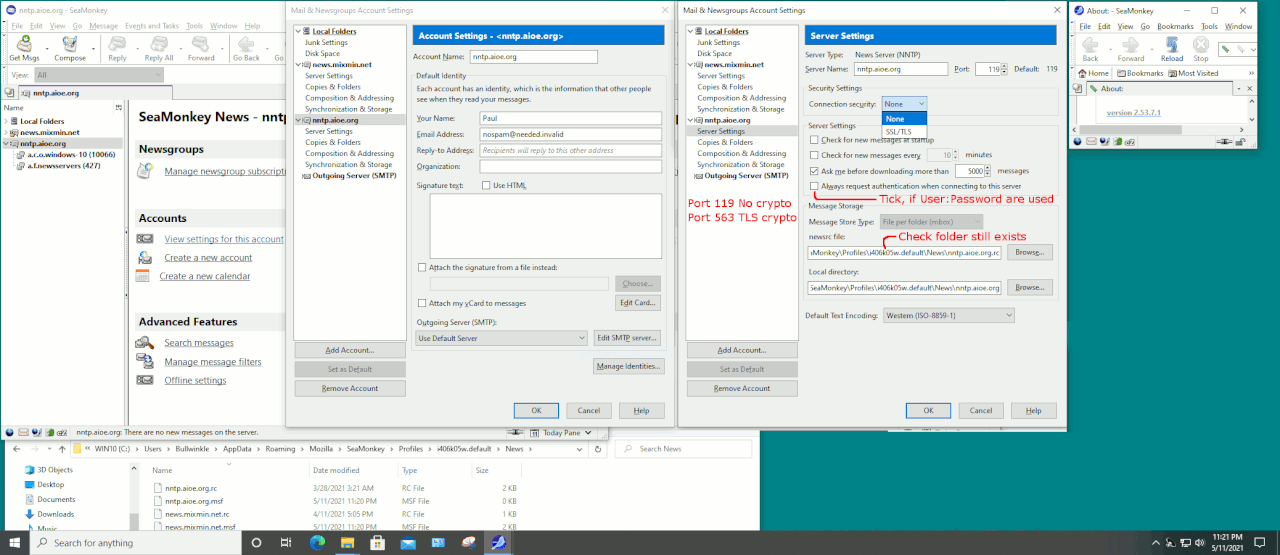
    https://i.postimg.cc/fy0tpZ8Y/seamonkey-news-config.gif

    I take it that "thecubenet" is an ISP NNTP server, provided by
    your ISP. Even on port 119, you might still be tasked by the
    ISP with using the UserName:Password assigned when you enrolled
    for it. If so, you need to tick "Always Request Authentication".

    With that setting, the first time you connect, a Username:Password
    box will appear, you put in the details. There should be a tick
    box as well, to "save password to password manager" or similar.
    This will avoid the annoyance of constantly having to enter
    those two pieces of info. Only if the login attempt is denied,
    will the username:password be forgotten, and new prompt boxes
    will appear on the screen.

    I was going to blame the usage of Port 563, TLS crypt, and the
    usage of Certificates for the outage. Maybe AIOE uses LetsEncrypt
    certificates, if you use Port 563. Some sites fail to update
    their Certificates on the correct data (a nuisance maintenance
    item for them), and then you can't get TLS Port 563 to work.

    But you claim to be using port 119, and the only remaining
    roadblock is ticking Always Request Authentication.

    In my sample picture, I don't have the box ticked, because
    AIOE doesn't user a username:password pair.

    Now, if TheCubeNet switched to Port 563 as a permanent change
    and dropped Port 119, the user has to switch the port and protocol
    on their end too. Most NSPs (News Service Providers) have
    a web page, with the current port choices. And from that
    page, you can see whether TLS 563 is the only port offered
    or not. If it did switch to 563, there's still a possibility
    a Certificate Store is too old. People have trouble on the
    client end, matching up with LetsEncrypt.

    If worse comes to worse, you can debug using Wireshark, and
    maybe you can see a TLS session rejected in there. But the message
    code should also cause a dialog on the SM News interface too.

    When Mixmin stopped working for me, it had switched to TLS.
    And I had certificate problems on my own end.

    Paul
    --- Synchronet 3.20a-Win32 NewsLink 1.114
  • From Robert Baer@rbaer3465@gmail.com to alt.computer on Sun May 16 14:26:36 2021
    On Tuesday, May 11, 2021 at 9:02:13 PM UTC-7, Paul wrote:
    Robert Baer wrote:
    Paul said:
    You are currently using Google Groups.

    Your (1) implies you are using the Newsreader
    in the Seamonkey suite, and this is pointed
    to some site like "nntp.aioe.org" "Port 119" or similar.
    * I am using news://news.thecubenet.com Port 119

    We need to know your server, to comment. For example,
    netfront.net has gone Read-Only so you cannot post there.
    Altopia is closed (acquired by another NSP).
    * I use news://news.thecubenet.com; never heard of Altopia or Albasani. Certainly not anywhere in the settings i see.

    * Am forced to use Google Groups because i cannot get NGs do not work
    in SeaMonkey.
    Do not know what to do to fix that.

    The thing about AIOE, is it does not use username:password and
    it makes a way for a person to test their skills. Message limit
    is maybe 20 messages per day posting, reading isn't limited in
    any practical way.

    https://i.postimg.cc/fy0tpZ8Y/seamonkey-news-config.gif

    I take it that "thecubenet" is an ISP NNTP server, provided by
    your ISP. Even on port 119, you might still be tasked by the
    ISP with using the UserName:Password assigned when you enrolled
    for it. If so, you need to tick "Always Request Authentication".

    With that setting, the first time you connect, a Username:Password
    box will appear, you put in the details. There should be a tick
    box as well, to "save password to password manager" or similar.
    This will avoid the annoyance of constantly having to enter
    those two pieces of info. Only if the login attempt is denied,
    will the username:password be forgotten, and new prompt boxes
    will appear on the screen.

    I was going to blame the usage of Port 563, TLS crypt, and the
    usage of Certificates for the outage. Maybe AIOE uses LetsEncrypt certificates, if you use Port 563. Some sites fail to update
    their Certificates on the correct data (a nuisance maintenance
    item for them), and then you can't get TLS Port 563 to work.

    But you claim to be using port 119, and the only remaining
    roadblock is ticking Always Request Authentication.

    In my sample picture, I don't have the box ticked, because
    AIOE doesn't user a username:password pair.

    Now, if TheCubeNet switched to Port 563 as a permanent change
    and dropped Port 119, the user has to switch the port and protocol
    on their end too. Most NSPs (News Service Providers) have
    a web page, with the current port choices. And from that
    page, you can see whether TLS 563 is the only port offered
    or not. If it did switch to 563, there's still a possibility
    a Certificate Store is too old. People have trouble on the
    client end, matching up with LetsEncrypt.

    If worse comes to worse, you can debug using Wireshark, and
    maybe you can see a TLS session rejected in there. But the message
    code should also cause a dialog on the SM News interface too.

    When Mixmin stopped working for me, it had switched to TLS.
    And I had certificate problems on my own end.

    Paul
    Thanks.
    --- Synchronet 3.20a-Win32 NewsLink 1.114