David K wrote:
I recently downloaded and installed AOL Desktop Gold (Revision 11.0.3316)
on a new desktop personal computer (Windows 10), and so far everything
except 1 very important thing works fine. That one important
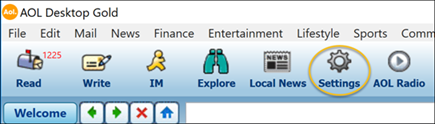
thing that won't work is the "Settings" button. When I click
on it, nothing happens. And when I click on it again (2nd attempt),
all I get is a black blank screen that I can't do anything with!
Please help, as I would really appreciate it...thank you.
Name: Install_AOL_Desktop.exe
Size: 112111608 bytes (106 MB)
SHA1: D5A60A4D6A98AAFF1B5D8AB980F3D1D9BBAFEF4D
C:\Users\UserName\Downloads\Install_AOL_Desktop.exe\
AOLDesktop-11.0.3316-full.nupkg\lib\net45\libcef.dll\.rsrc\1033\
VALUE "FileDescription", "Chromium Embedded Framework (CEF) Dynamic Link Library"
VALUE "FileVersion", "90.6.6+g3c44b04+chromium-90.0.4430.93"
VALUE "InternalName", "libcef"
VALUE "LegalCopyright", "Copyright (C) 2021 The Chromium Embedded Framework Authors"
VALUE "OriginalFilename", "libcef.dll"
VALUE "ProductName", "Chromium Embedded Framework (CEF) Dynamic Link Library"
VALUE "ProductVersion", "90.6.6+g3c44b04+chromium-90.0.4430.93"
Looks like they use a Google Chrome-like engine. But just
the engine portion, not a whole Chrome (or Chromium) browser.
That is what libcef.dll is for - it provides browser services.
AOL would not want to have to write its own browser.
The main executable appears to be AolDesktop.exe and it
would load libcef.dll . The cute window it draws, that's
likely to be all done with HTML/js and not by EXE type
code. To debug your problem, in naive cases you'd find
the file with the HTML/js that draws the window and
make modifications to that, to change the behavior.
But applications like this one, will find ways to hide
what they're doing. I checked the log files, and even
the logfile entries, paths in them are protected by
a simple substitution code. (Breakable - but there aren't
enough hours in the day, to deal with crap like this.)
*******
The Settings button could be this one.
https://s.aolcdn.com/os/help/000000_New_Salesforce_Org/000009322/aol_desktop_gold_faqs_1.png
At a guess, the Edit:Preference type items and the Settings
button, rely on the "AOL Login" status. If you're not
logged in, you don't get to change the settings. It
is likely the Login window which is trying to pop to the
front when you click Settings. It's successful when doing
that in my test VM. Settings button causes the Login window
to appear, and no Settings are offered, because I don't
have an account. This means, it's quite likely the
Settings are "stored in the Cloud" at AOL.
The browser engine libcef.dll, would have hardware
acceleration for some operations. It is possible the
black window is caused by a graphics failure (when
they're trying to draw the login dialog???). On a
normal Chrome browser, there would be a setting to
disable hardware acceleration (necessary, because
not all video cards have workable acceleration).
But I think you can see a degree of circular logic
in this case, that if the thing refuses to allow you
to set stuff, you'd have a problem. (And this is
not the only case - I've tried to help people before,
where we needed to disable hardware acceleration and
the software would die before you could get to the
setting.)
The individual applications to the left of the Settings
button, seem to work. You can start some "Editor session",
but exactly why, who knows. If there was an application
button that worked like a browser, you could use chrome:\\
type URL bar commands.
https://www.howtogeek.com/412738/how-to-turn-hardware-acceleration-on-and-off-in-chrome/
chrome://settings/
But obviously, AOL "Gold" is a "support shakedown". Sure,
they have a support phone number, but they also have
monthly fees for "AOL Members".
Now, really, I would have expected the Login window to
appear, as soon as the application starts. You can dismiss
the login window by clicking the "X" on it, but clicking
Settings from the top row, causes the Login window to come
back. You can't just dismiss it, and get your own way. The
window is just as obnoxious as a Google login or a Microsoft
login prompt.
One other thing. You're in Windows 10. If you open Task Manager (control-alt-delete being the traditional way), there is a
GPU tab in the Performance section. Seeing that GPU tab,
means you have a reasonably modern WDDM graphics driver. If
the GPU tab is missing and you can't tell what percentage
of GPU horsepower is being used, this is a sign that an
older driver is being used. For example, if the driver is
old enough, the OpenGL code in the driver lacks the
"Memory Remaining" procedure. Then, some programs which
use OpenGL calls for hardware acceleration, they can fail
and crash because they cannot access a perfectly working
"Memory Remaining" call. I don't really think your setup
is that crusty, but that's an example of a hole I dropped
into myself (Windows LibreOffice Calc crash). Maybe back
in 2015-2016 or so.
Paul
--- Synchronet 3.20a-Win32 NewsLink 1.114