Robert Baer wrote:
No programs anymore? "app"s already?
Is that why Win10 so......AFU?
And i need some kind of Windows account, to get an "app" at their
"store"?
Are you trying to say that i no longer have a computer, but actually a "smart fone" in drag?
Gimme Win9!
There are some differences.
A guy like yourself, a Win32 guy, is familiar with
program.exe files. The EXE is an object code format
that runs directly on the processor, without any interpretation.
The code is x86 or x86-64 executable code. File identification
utilities call these files "PE32" or "PE32+" respectively.
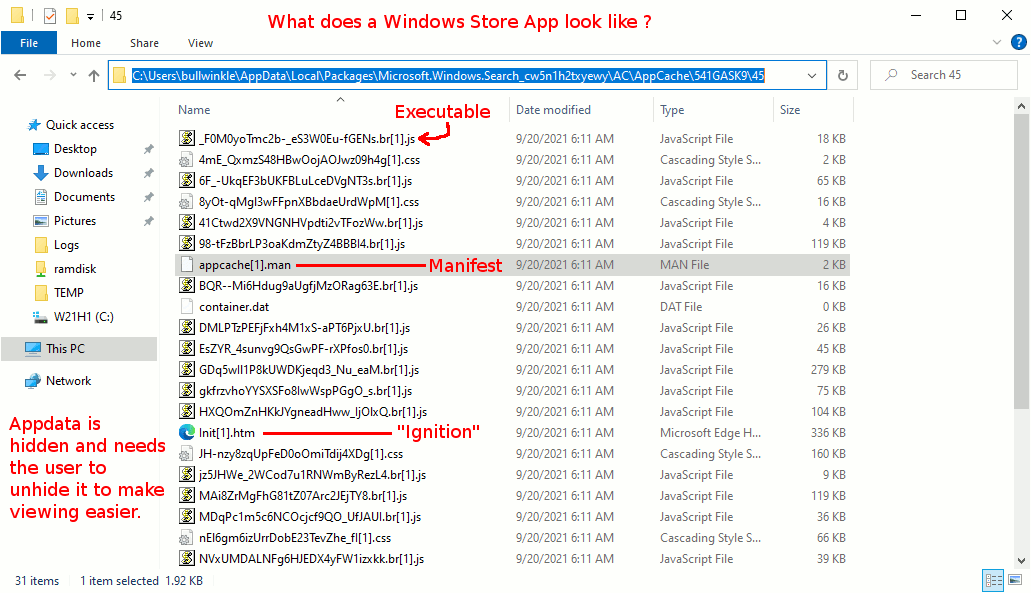
Well, an "App" is an HTML plus Javascript package,
like a ZIP with a set of files in it. These are loaded
and run with the same kind of functions you might get
from an EXE. The package has a "manifest file" that
mentions what components are present. The components
can be "signed" or "hashed", to make it easier to detect alteration.
If alteration is detected, or the user deletes a .htm
or a .js, the Windows Store will download the file set
again and replace the damaged goods. Actually, they seem
to pay more attention to the .js than to the .htm .
Similarly, if the software is revved and a new
version is released, the Windows Store can download
a new version automatically without user interaction.
And this is an operation separate from Windows Update.
However, this distinction may blur soon, as the
Windows Store may begin to carry a wider range of
products, and might even have EXE files for sale in it.
A challenge for you then, is to find one of these
App packages and see how it works.
*******
# The infrastructure support is unfriendly.
# This will show a series of materials suitable for making shortcuts.
# Actually, there is nothing "pure" about this folder, and it actually
# contains a variety of executables.
explorer.exe shell:AppsFolder
# An item found in the folder, will have path info like this.
# The identifier "8wekyb3d8bbwe" and "cw5n1h2txyewy" are common
# to all installations and are identifiers of the Microsoft Corporation.
explorer.exe shell:AppsFolder\Microsoft.YourPhone_8wekyb3d8bbwe!App
# The YourPhone on my example setup was pretty empty
# so we can look at Windows Search as an example of an App instead.
# This picture shows the directory contents that are executed
# to make Windows Search work. Lots of individual Javascript files.
https://i.postimg.cc/LsdwZDDf/Windows-App-Executable-Code.gif
The directory in that picture is:
C;\Users\bullwinkle\AppData\Local\Packages\Microsoft.Windows.Search_cw5n1h2txyewy
AC\AppCache\541GASK9\45
so the materials are not in C:\Program Files for a starter.
Let's say we have a sample App called "Daisy.App"
I can have, as detected by using Agent Ransack to scan
my C: drive
# Materials that came with Daisy.App
daisy.exe # They include an EXE, but it is empty and has
# a manifest that tells the system what to launch
# from Appdata. This EXE is USELESS!!! The PE32 format
# at the beginning of this file is null and empty.
daisy.htm # Might control the launch in the Appdata folder.
daisy.js # An executable file that does the hard work.
OK, so what happens when I double-click "daisy.exe". Why SFA!!!
The screen blinks for a microsecond, and the program does not
launch.
I need to find an icon somewhere, to launch it. The icon
might well be in here for example.
explorer.exe shell:AppsFolder
Or, it'll be in your Start menu, in the program section.
But generally speaking, you do not have the freedom to
start it from Command Prompt. Running "daisy.exe" is a
waste of your time! You have been warned. The whole business
is strange.
When the system makes a "shortcut" to an App, the App
pseudo-command-line format does not accept arguments and you cannot
edit the shortcut in a useful way. This suggests that Apps
do not have command line parameter passing.
Paul
--- Synchronet 3.20a-Win32 NewsLink 1.114