• Win10 password?

    From Robert Baer@robertbaer@localnet.com to alt.computer on Tue Sep 21 04:02:19 2021
    So i got a nice collection of "programs"/"apps carefully selected on
    a USB stick ready to go.
    After an hour or so, had the "new" Lenovo connected keyboard/mouse/VGA.

    Nice splash screen.
    What the hell do i do for the unknown password?
    --
    This email has been checked for viruses by Avast antivirus software. https://www.avast.com/antivirus

    --- Synchronet 3.20a-Win32 NewsLink 1.114
  • From Paul@nospam@needed.invalid to alt.computer on Tue Sep 21 08:35:09 2021
    Robert Baer wrote:
    So i got a nice collection of "programs"/"apps carefully selected on a
    USB stick ready to go.
    After an hour or so, had the "new" Lenovo connected keyboard/mouse/VGA.

    Nice splash screen.
    What the hell do i do for the unknown password?


    During the OutOfBoxExperience (OOBE, those dialogs that ask
    about setting up the machine), did you define a password ???
    Is the password blank ?

    If you got this machine and it did not prompt for a new name
    ("baer") so you could have C:\users\baer , then the machine
    may be used and maybe it had C:\users\wally and you did not
    notice ?

    *******

    Step 1 : Around the login screen, there should be an icon
    with various options in it and one of the options
    should be a shutdown-type option.

    That's to get you out of the prompt. Without just pushing
    the power button, as I might do if I was upset or angry.

    The second question is, whether your setup autologs at boot.
    Some people have their machine set up, so it locks and prompts
    for a password, if the machine is inactive for ten minutes.
    Whereas, when the machine boots, they'd used "netplwiz" to remove
    the need for a login password.

    If this was the case, then

    Step 2 : Now, boot up again, and if you have autolog, then
    you'll be back into the screen, and you can use
    Start : Run : control to get to control panels, then
    use the Power control panel to disable the screen locker.

    If you don't have autolog, you'll have to use a password
    reset hack if the account is a local one. If you've been
    using an MSA password, then that's going to be tougher
    to fix, if you've lost the MSA password. You can do a password
    reset, but this requires that the email account used to set up
    the MSA, to still be available.

    The only way this password is "unknown", is if
    this machine is used. If you haven't set it up yet,
    you can use the "reset" procedure in the Lenovo
    manual, to reload C: . Then it should go through OOBE
    again, and you can define the local account and
    its local password. Do the local account first,
    so you have an account with your preferred name.

    If the Lenovo is so used, it has "Refurbisher Windows 10"
    on it, then you would need the "Refurbisher Windows 10"
    DVD to reinstall. The Refurb machines don't seem to have a
    restore partition on them. A Refurb machine doesn't have
    a Lenovo OS on it either. It's closer to a generic
    copy of Windows that a retail DVD would make. If you wanted
    a restore image, you have to make one (on a USB stick for example).
    Windows has some procedure for preparing such. I made one
    a few years ago as an experiment, and it took a couple
    tries to complete.

    If the machine has Refurbisher Windows 10 on it,
    one of the first things you do is use Nirsoft Produkey
    or MagicJellyBean, to record the 25 character license key
    for later. As the key on a Refurb, might not be the same
    as the license key the machine came with. (The refurbisher
    scrapes the COA off the machine sometimes, before shipping,
    leaving nothing for the qualifying OS.)

    Are we having fun yet ? I've been through some of this,
    I don't know if you can tell or not. One diff with me,
    is I asked the seller (store downtown) for the installer
    DVD and they had one. Mine is a Windows 7 Refurbisher.
    Microsoft stopped shipping those hologram DVDs some
    time ago. But no matter what media you use, you'll need
    a key, and the key isn't necessarily in the BIOS as an
    ACPI MSDM table either. That's why you need Produkey.

    *******

    Using the "windir" option here, you can carry the hard drive
    from the Lenovo, over to your working technician machine,
    and while booted with the C: of the technician machine,
    check the E:\Windows of the Lenovo drive you installed
    into the computer for maintenance.

    https://www.nirsoft.net/utils/product_cd_key_viewer.html

    It is possible to capture the key off the Lenovo drive,
    even if you can't see the screen. It just means plugging
    the drive into another machine so ProduKey can get at it.

    Windows Defender considers ProduKey to be "hackware" and
    it will attempt to quarantine it. This is just harassment
    from Microsoft. The software performs a necessary function
    for maintenance purposes.

    Paul
    --- Synchronet 3.20a-Win32 NewsLink 1.114
  • From Robert Baer@robertbaer@localnet.com to alt.computer on Tue Sep 21 20:47:03 2021
    Paul wrote:
    Robert Baer wrote:
      So i got a nice collection of "programs"/"apps carefully selected on
    a USB stick ready to go.
      After an hour or so, had the "new" Lenovo connected keyboard/mouse/VGA. >>
      Nice splash screen.
      What the hell do i do for the unknown password?


    During the OutOfBoxExperience (OOBE, those dialogs that ask
    about setting up the machine), did you define a password ???
    Is the password blank ?

    If you got this machine and it did not prompt for a new name
    ("baer") so you could have C:\users\baer , then the machine
    may be used and maybe it had C:\users\wally and you did not
    notice ?

    *******

    Step 1 : Around the login screen, there should be an icon
             with various options in it and one of the options
             should be a shutdown-type option.

    That's to get you out of the prompt. Without just pushing
    the power button, as I might do if I was upset or angry.

    The second question is, whether your setup autologs at boot.
    Some people have their machine set up, so it locks and prompts
    for a password, if the machine is inactive for ten minutes.
    Whereas, when the machine boots, they'd used "netplwiz" to remove
    the need for a login password.

    If this was the case, then

    Step 2 : Now, boot up again, and if you have autolog, then
             you'll be back into the screen, and you can use
             Start : Run : control to get to control panels, then
             use the Power control panel to disable the screen locker.

             If you don't have autolog, you'll have to use a password
             reset hack if the account is a local one. If you've been
             using an MSA password, then that's going to be tougher
             to fix, if you've lost the MSA password. You can do a password
             reset, but this requires that the email account used to set up
             the MSA, to still be available.

    The only way this password is "unknown", is if
    this machine is used. If you haven't set it up yet,
    you can use the "reset" procedure in the Lenovo
    manual, to reload C: . Then it should go through OOBE
    again, and you can define the local account and
    its local password. Do the local account first,
    so you have an account with your preferred name.

    If the Lenovo is so used, it has "Refurbisher Windows 10"
    on it, then you would need the "Refurbisher Windows 10"
    DVD to reinstall. The Refurb machines don't seem to have a
    restore partition on them. A Refurb machine doesn't have
    a Lenovo OS on it either. It's closer to a generic
    copy of Windows that a retail DVD would make. If you wanted
    a restore image, you have to make one (on a USB stick for example).
    Windows has some procedure for preparing such. I made one
    a few years ago as an experiment, and it took a couple
    tries to complete.

    If the machine has Refurbisher Windows 10 on it,
    one of the first things you do is use Nirsoft Produkey
    or MagicJellyBean, to record the 25 character license key
    for later. As the key on a Refurb, might not be the same
    as the license key the machine came with. (The refurbisher
    scrapes the COA off the machine sometimes, before shipping,
    leaving nothing for the qualifying OS.)

    Are we having fun yet ? I've been through some of this,
    I don't know if you can tell or not. One diff with me,
    is I asked the seller (store downtown) for the installer
    DVD and they had one. Mine is a Windows 7 Refurbisher.
    Microsoft stopped shipping those hologram DVDs some
    time ago. But no matter what media you use, you'll need
    a key, and the key isn't necessarily in the BIOS as an
    ACPI MSDM table either. That's why you need Produkey.

    *******

    Using the "windir" option here, you can carry the hard drive
    from the Lenovo, over to your working technician machine,
    and while booted with the C: of the technician machine,
    check the E:\Windows of the Lenovo drive you installed
    into the computer for maintenance.

    https://www.nirsoft.net/utils/product_cd_key_viewer.html

    It is possible to capture the key off the Lenovo drive,
    even if you can't see the screen. It just means plugging
    the drive into another machine so ProduKey can get at it.

    Windows Defender considers ProduKey to be "hackware" and
    it will attempt to quarantine it. This is just harassment
    from Microsoft. The software performs a necessary function
    for maintenance purposes.

       Paul

    Thanks.
    With only 2 SATA ports, i will BAERly make it possible.
    --
    This email has been checked for viruses by Avast antivirus software. https://www.avast.com/antivirus

    --- Synchronet 3.20a-Win32 NewsLink 1.114
  • From Paul@nospam@needed.invalid to alt.computer on Wed Sep 22 03:52:25 2021
    Robert Baer wrote:


    Thanks.
    With only 2 SATA ports, i will BAERly make it possible.

    It seems since the last time I used the hacks, Windows 10
    is hardened a lot more than it used to be.

    Some of it is semi-accidental, such as Microsoft using

    compact.exe /compactos:query

    compact.exe /compactos:never <=== user fights back by removing compression

    compact.exe /compactos:always <=== places new-style compression reparse
    points on system32 files or similar areas

    This matters when you need to hack some files from Linux.

    *******

    For an example, this "official" page offers local resetting
    of password based on your security questions. Which of course,
    you didn't set. Someone else did. You won't know which security
    questions and what the answers are.

    The second option is a "Reset" of the PC to start over again.
    If done from the hard drive, this is likely to need a recovery
    partition (on Refurbisher, that is not there).

    You can also make a USB stick in advance. I did
    that once, and you need a working reagentc /info for the making
    of the stick to succeed. On several occasions, my reagentc wasn't
    enabled or wasn't pointed at the right place, so a person could be
    forgiven if they said this was "too hard to prepare". This is a
    corny way of restoring C: , and I presume it requests account
    setup when finished. That's when you get to define a password.

    https://support.microsoft.com/en-us/windows/reset-your-windows-local-account-password-86912508-e584-37cc-86eb-6e9b0542b5ba

    *******

    There used to be some hacks involving sethc.exe (sticky keys),
    osk.exe (onscreen keyboard for entering password), and utilman.exe.
    You select these functions, and cmd.exe pops up instead.

    Some of these have been covered by Windows Defender. If Windows
    Defender was disabled, they might still works, but what are the
    odds you run that way.

    https://www.trustedsec.com/blog/playing-with-old-hacks/

    Now, you're saying "he has some that work!". Yes, but the
    thing is, we need to do some rename commands and that
    stuff is owned by trustedinstaller or something. This means,
    if booting using an installer DVD, using "Troubleshooting",
    then Command Prompt, we still might not be allowed to rename
    files and mess around from the Win side of the pond.

    Anyway, I've had to do a restore of my Win10 while messing
    around, and it's going to be a while before I can try some
    things. It looks like the CHKDSK on C: is going to take *Hours*.

    Paul
    --- Synchronet 3.20a-Win32 NewsLink 1.114
  • From Paul@nospam@needed.invalid to alt.computer on Wed Sep 22 11:46:17 2021
    Paul wrote:
    Robert Baer wrote:


    Thanks.
    With only 2 SATA ports, i will BAERly make it possible.


    https://www.trustedsec.com/blog/playing-with-old-hacks/


    OK, working.

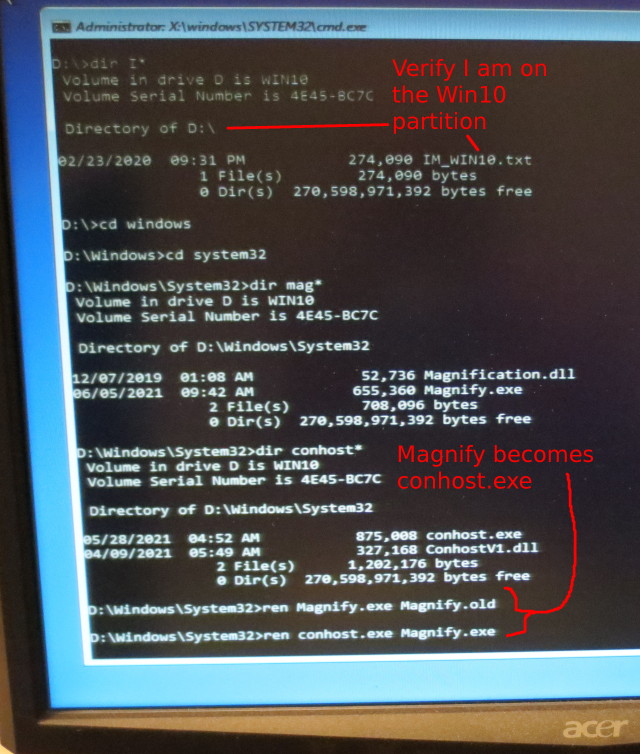
    Can fix from a Win10 DVD and the Repair : Troubleshooting : Command Prompt.

    https://i.postimg.cc/tJfZq30X/edit-OS-from-DVD-troubleshooter-cmd.jpg

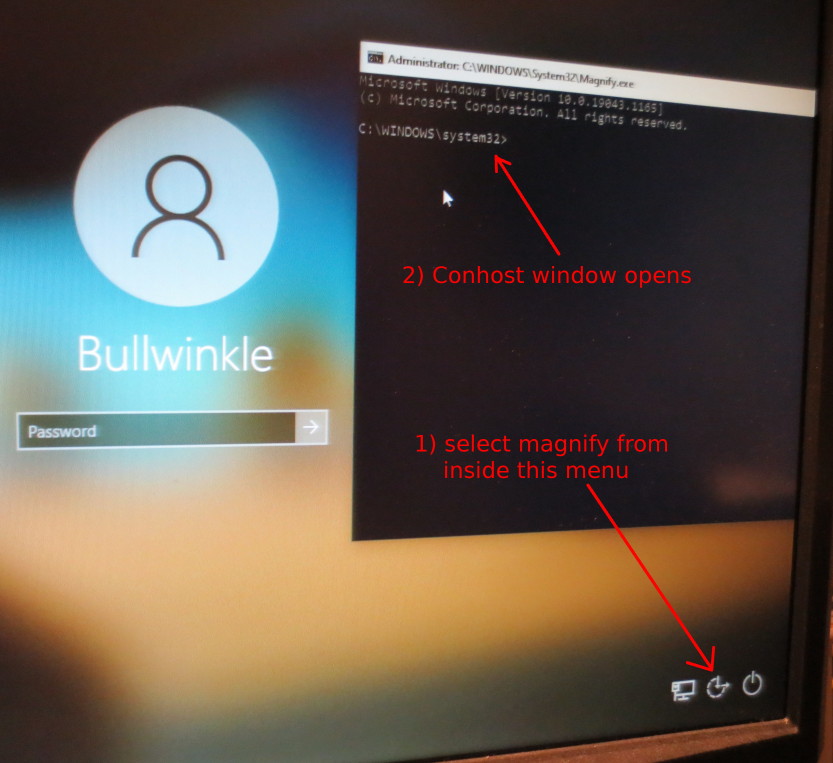
    https://i.postimg.cc/LsXJ1QHH/login-trick.jpg

    In the window that opens, use

    net user administrator /active:yes

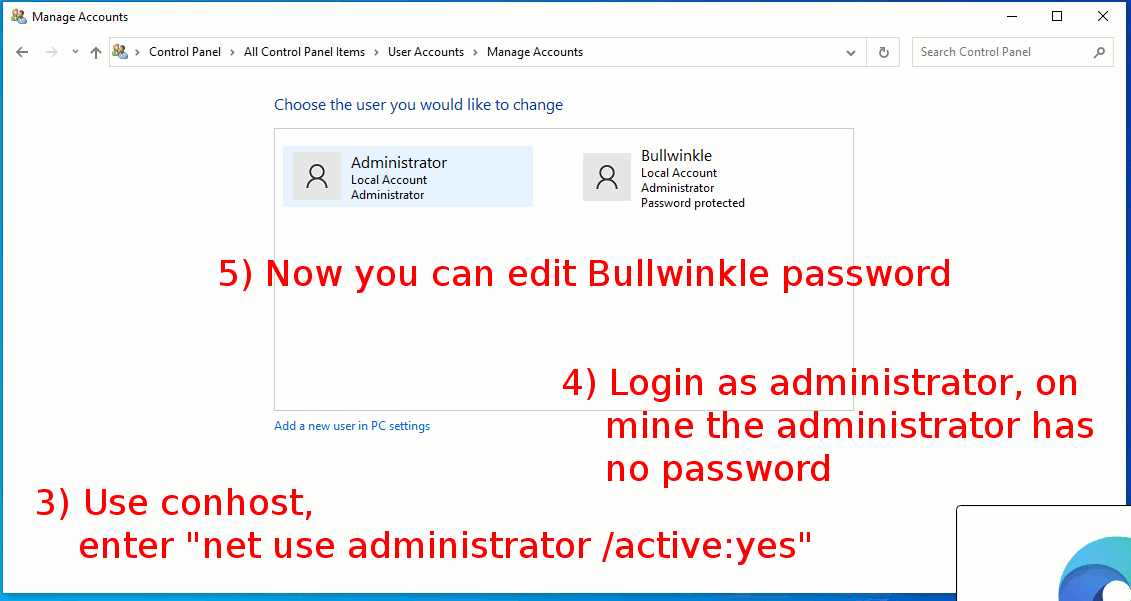
    https://i.postimg.cc/nrd5CLTV/edit-account-password-using-administrator.gif

    Using the Windows 10 DVD and the Command Prompt window
    to rename the files, there was no problem from a
    permissions perspective. The "rename" or "ren" command
    is being used, to cause the least upset.

    After resetting the Bullwinkle password to a known
    value, then I can "sign out", then sign back in as
    Bullwinkle, and since Bullwinkle belongs to the
    Administrator group, I can

    net user administrator /active:no

    and that part of the hack is undone.

    I also have to rename the two files involved,
    so that everything is put back where it belongs.

    "Rename" for me, causes the least disruption once
    everything is put back. It's likely still owned
    by TrustedInstaller.

    I have not mentioned the two files in this text, as the
    first picture shows which ones I selected for the job.
    I don't want to get Microsoft too excited about this.

    For my Win10 boot material (not that it matters), I
    have a Win10 ISO file, I used rufus.ie tool to put
    the ISO onto a USB stick. And I booted from the USB
    stick. I made my setup UEFI/GPT rather than MBR,
    which is OK on a newer computer.

    https://en.wikipedia.org/wiki/Rufus_%28software%29

    HTH,
    Paul
    --- Synchronet 3.20a-Win32 NewsLink 1.114
  • From Paul@nospam@needed.invalid to alt.computer on Wed Sep 22 19:16:47 2021
    Robert Baer wrote:
    So i got a nice collection of "programs"/"apps carefully selected on a
    USB stick ready to go.
    After an hour or so, had the "new" Lenovo connected keyboard/mouse/VGA.

    Nice splash screen.
    What the hell do i do for the unknown password?


    And don't forget, once you're back into the machine, to

    Record the OS license key, while you still can!

    Write the key on something robust, store inside
    the chassis to prevent loss of the paper.

    Scroll to 70% on this page, for an example. Note that
    Windows Defender realtime should be disabled while
    you do this, since it defines that program as "hackware".

    https://www.nirsoft.net/utils/product_cd_key_viewer.html

    Another example. Or Belarc Advisor if you have a copy
    on disk already.

    https://m.majorgeeks.com/files/details/showkeyplus.html

    You need that key, for the day a reinstall is required.
    If the key ends in 3V66T, that's a bogus key, and the
    real key is... elsewhere. On a Refurb machine, that
    should be a legit key, not one of the bogus keys.

    Examples of bogus keys that exist, if you upgrade
    a Win7 with free Win10 over top. Note the 3V66T on
    the end of the first one.

    VK7JG-NPHTM-C97JM-9MPGT-3V66T (Windows 10 Professional) <--- Test Machine YTMG3-N6DKC-DKB77-7M9GH-8HVX7 (Windows 10 Home - multi language) <--- laptop!
    BT79Q-G7N6G-PGBYW-4YWX6-6F4BT (Windows 10 Home - single language)

    My laptop had the multi-language key, since the laptop
    is English/FrenchCanadian by design. That's what they
    do for the Canadian market.

    Paul
    --- Synchronet 3.20a-Win32 NewsLink 1.114
  • From Robert Baer@robertbaer@localnet.com to alt.computer on Sat Sep 25 22:17:42 2021
    Paul wrote:
    Robert Baer wrote:
      So i got a nice collection of "programs"/"apps carefully selected on
    a USB stick ready to go.
      After an hour or so, had the "new" Lenovo connected keyboard/mouse/VGA. >>
      Nice splash screen.
      What the hell do i do for the unknown password?


    And don't forget, once you're back into the machine, to

       Record the OS license key, while you still can!

       Write the key on something robust, store inside
       the chassis to prevent loss of the paper.

    Scroll to 70% on this page, for an example. Note that
    Windows Defender realtime should be disabled while
    you do this, since it defines that program as "hackware".

    https://www.nirsoft.net/utils/product_cd_key_viewer.html

    Another example. Or Belarc Advisor if you have a copy
    on disk already.

    https://m.majorgeeks.com/files/details/showkeyplus.html

    You need that key, for the day a reinstall is required.
    If the key ends in 3V66T, that's a bogus key, and the
    real key is... elsewhere. On a Refurb machine, that
    should be a legit key, not one of the bogus keys.

    Examples of bogus keys that exist, if you upgrade
    a Win7 with free Win10 over top. Note the 3V66T on
    the end of the first one.

    VK7JG-NPHTM-C97JM-9MPGT-3V66T (Windows 10 Professional) <--- Test Machine YTMG3-N6DKC-DKB77-7M9GH-8HVX7 (Windows 10 Home - multi language)    <--- laptop!
    BT79Q-G7N6G-PGBYW-4YWX6-6F4BT (Windows 10 Home - single language)

    My laptop had the multi-language key, since the laptop
    is English/FrenchCanadian by design. That's what they
    do for the Canadian market.

       Paul
    I am a penny-pinching Scrooge at best.
    The software is worthless; only the full version works, making the
    key unavailable.
    Why should i $pend so much money for one key?

    Did a LOT of searching.

    Was VERY lucky and found the password.

    There is a long string of numbers in the splash screen:
    19174209416

    Seems useless - what is it for?

    Thanks.
    --
    This email has been checked for viruses by Avast antivirus software. https://www.avast.com/antivirus

    --- Synchronet 3.20a-Win32 NewsLink 1.114
  • From Paul@nospam@needed.invalid to alt.computer on Sun Sep 26 02:01:50 2021
    Robert Baer wrote:
    Paul wrote:
    Robert Baer wrote:
    So i got a nice collection of "programs"/"apps carefully selected
    on a USB stick ready to go.
    After an hour or so, had the "new" Lenovo connected
    keyboard/mouse/VGA.

    Nice splash screen.
    What the hell do i do for the unknown password?


    And don't forget, once you're back into the machine, to

    Record the OS license key, while you still can!

    Write the key on something robust, store inside
    the chassis to prevent loss of the paper.

    Scroll to 70% on this page, for an example. Note that
    Windows Defender realtime should be disabled while
    you do this, since it defines that program as "hackware".

    https://www.nirsoft.net/utils/product_cd_key_viewer.html

    Another example. Or Belarc Advisor if you have a copy
    on disk already.

    https://m.majorgeeks.com/files/details/showkeyplus.html

    You need that key, for the day a reinstall is required.
    If the key ends in 3V66T, that's a bogus key, and the
    real key is... elsewhere. On a Refurb machine, that
    should be a legit key, not one of the bogus keys.

    Examples of bogus keys that exist, if you upgrade
    a Win7 with free Win10 over top. Note the 3V66T on
    the end of the first one.

    VK7JG-NPHTM-C97JM-9MPGT-3V66T (Windows 10 Professional) <--- Test Machine
    YTMG3-N6DKC-DKB77-7M9GH-8HVX7 (Windows 10 Home - multi language)
    <--- laptop!
    BT79Q-G7N6G-PGBYW-4YWX6-6F4BT (Windows 10 Home - single language)

    My laptop had the multi-language key, since the laptop
    is English/FrenchCanadian by design. That's what they
    do for the Canadian market.

    Paul
    I am a penny-pinching Scrooge at best.
    The software is worthless; only the full version works, making the key unavailable.
    Why should i $pend so much money for one key?

    Did a LOT of searching.

    Was VERY lucky and found the password.

    There is a long string of numbers in the splash screen:
    19174209416

    Seems useless - what is it for?

    Thanks.

    A mobile (cell phone) number ???

    +19174209416

    New York ? It is hard to tell from the
    Google result, what is real and what is SEO spam.

    Paul
    --- Synchronet 3.20a-Win32 NewsLink 1.114
  • From Robert Baer@robertbaer@localnet.com to alt.computer on Mon Sep 27 22:32:46 2021
    Paul wrote:
    Robert Baer wrote:
    Paul wrote:
    Robert Baer wrote:
      So i got a nice collection of "programs"/"apps carefully selected
    on a USB stick ready to go.
      After an hour or so, had the "new" Lenovo connected
    keyboard/mouse/VGA.

      Nice splash screen.
      What the hell do i do for the unknown password?


    And don't forget, once you're back into the machine, to

        Record the OS license key, while you still can!

        Write the key on something robust, store inside
        the chassis to prevent loss of the paper.

    Scroll to 70% on this page, for an example. Note that
    Windows Defender realtime should be disabled while
    you do this, since it defines that program as "hackware".

    https://www.nirsoft.net/utils/product_cd_key_viewer.html

    Another example. Or Belarc Advisor if you have a copy
    on disk already.

    https://m.majorgeeks.com/files/details/showkeyplus.html

    You need that key, for the day a reinstall is required.
    If the key ends in 3V66T, that's a bogus key, and the
    real key is... elsewhere. On a Refurb machine, that
    should be a legit key, not one of the bogus keys.

    Examples of bogus keys that exist, if you upgrade
    a Win7 with free Win10 over top. Note the 3V66T on
    the end of the first one.

    VK7JG-NPHTM-C97JM-9MPGT-3V66T (Windows 10 Professional) <--- Test
    Machine
    YTMG3-N6DKC-DKB77-7M9GH-8HVX7 (Windows 10 Home - multi language) <---
    laptop!
    BT79Q-G7N6G-PGBYW-4YWX6-6F4BT (Windows 10 Home - single language)

    My laptop had the multi-language key, since the laptop
    is English/FrenchCanadian by design. That's what they
    do for the Canadian market.

        Paul
      I am a penny-pinching Scrooge at best.
      The software is worthless; only the full version works, making the
    key unavailable.
      Why should i $pend so much money for one key?

      Did a LOT of searching.

      Was VERY lucky and found the password.

      There is a long string of numbers in the splash screen:
    19174209416

      Seems useless - what is it for?

    Thanks.

    A mobile (cell phone) number ???
    * Bingo. Oregon. Mine.
    I know i did a lot during setup, where no password was needed.


    +19174209416

    New York ? It is hard to tell from the
    Google result, what is real and what is SEO spam.

       Paul
    --
    This email has been checked for viruses by Avast antivirus software. https://www.avast.com/antivirus

    --- Synchronet 3.20a-Win32 NewsLink 1.114