So, for arguments sake, i would like to put on the hard drive DOS,
Linux, Win7 and Win10.
And since i am starting with 4 drives i would naively partition an
empty drive into 4 partitions, and just copy each drive onto a partition
and use a partition manager to select and boot where i want.
OK, the way HDs have been set up is extremely wasteful, one giant
track and sector.
All else there off to the sunset forever.
Seems to me, in the old daze where space was supposedly at a premium,
that non-use would have been accounted for.
Well, as a result we have (at least i do not have to take off my
shoes to count) 4 (four) partitions.
Then these new(er) OSes go and WASTE one by eating a partition for
the very space-wasting boot sector...more space non-use.
And they go-ahead and byte all over attempts to (independently) make
4 partitions.
So, for arguments sake, i would like to put on the hard drive DOS,
Linux, Win7 and Win10.
And since i am starting with 4 drives i would naively partition an
empty drive into 4 partitions, and just copy each drive onto a partition
and use a partition manager to select and boot where i want.
Comments?
OK, the way HDs have been set up is extremely wasteful, one giant track and sector. All else there off to the sunset forever.
Seems to me, in the old daze where space was supposedly at a premium, that non-use would have been accounted for.
Well, as a result we have (at least i do not have to take off my shoes to count) 4 (four) partitions.
Then these new(er) OSes go and WASTE one by eating a partition for the very space-wasting boot sector...more space non-use.
And they go-ahead and byte all over attempts to (independently) make 4 partitions.
So, for arguments sake, i would like to put on the hard drive DOS, Linux, Win7 and Win10.
And since i am starting with 4 drives i would naively partition an empty drive into 4 partitions, and just copy each drive onto a partition and use a partition manager to select and boot where i want.
Comments?
On Wed, 6 Oct 2021 19:19:38 -0700, Robert Baer wrote:* Do not know what NT6+ etc are.
So, for arguments sake, i would like to put on the hard drive DOS,
Linux, Win7 and Win10.
IMO, there's no point of having two Windows versions where both are NT6+. When one is NT6+, it would only make sense if the the other is NT 4.x-5.x, because there are things that are no longer available in NT6+.
And since i am starting with 4 drives i would naively partition an
empty drive into 4 partitions, and just copy each drive onto a partition
and use a partition manager to select and boot where i want.
That would work if it's just in terms of copying/restoring files from different drives or backup/archive.
Copying OS requires more effort. Especially for Windows OS. Linux OS on the other hand, surprisingly doesn't require as much effort as Windows OS, as
its boot manager is quite flexible already, and the OS doesn't bound itself to a specific partition location & size like Windows does.
IOTW, for Linux there's a high chance that it may not require additional effort. But for Windows, there's a high chance that it will require additional effort. ...to make the copied OS partition be bootable from the new drive.
On 10/6/21 8:19 PM, Robert Baer wrote:* THAT is the sane way to go, and the why of my complaint.
OK, the way HDs have been set up is extremely wasteful, one giant
track and sector.
Please define what you mean by "one giant track and sector". *ALL* of
the hard drives that I've used for the past 30 years, and I do mean
/all/, have had many tracks, with each track having many sectors therein.
All else there off to the sunset forever.
And yet we have many different partitioning schemes. So it seems to me that the first thing used wasn't /forever/.
Seems to me, in the old daze where space was supposedly at a premium,
that non-use would have been accounted for.
The slack space at the end of the files verses the allocation that they consumed has been a form of contention for the entire time that I've
been using hard drives. That's where cluster sizes comes into play with file systems.
Well, as a result we have (at least i do not have to take off my shoes
to count) 4 (four) partitions.
What is a partition?
- primary
- logical
- BSD disk slice
- Microsoft dynamic
- Logical Volume
- something else
Then these new(er) OSes go and WASTE one by eating a partition for the
very space-wasting boot sector...more space non-use.
I suppose that you're talking about Microsoft OSes. I can still install contemporary Linux in a single partition with the boot loader living in
the unused space of the first sector that is not included in a partition.
* That is what i am familiar with and works very well.And they go-ahead and byte all over attempts to (independently) make 4
partitions.
I think your attempts are significantly different than my ... successes.
So, for arguments sake, i would like to put on the hard drive DOS,
Linux, Win7 and Win10.
DOS will almost certainly need it's own partition.
Linux will almost certainly need it's own partition.
Windows 7 and Windows 10 may be able to be installed in the same common partition. I've done so with Windows NT 4.0, Windows 2000, and Windows
XP in the past. -- I'm sure it's contrary to Microsoft's recommendations. But that doesn't mean that it's not possible.
And since i am starting with 4 drives i would naively partition an
empty drive into 4 partitions, and just copy each drive onto a
partition and use a partition manager to select and boot where i want.
/Partition/ managers and /boot/ managers are distinctly *different* things. They frequently come as a bundle, but they are quite different things. The former is meant for altering partition tables. The latter
is meant to allow you to boot different OSs. Sometimes the latter only automates altering the active partition. Usually the latter is in and
of itself a micro OS that presents you with a menu to choose what OS you want to chain load.
Comments?
There is a lot of minutia in what you are talking about. Some minutia
is compatible with other minutia, and some is incompatible.
On 10/6/21 8:19 PM, Robert Baer wrote:* The partition sector is the worst.
OK, the way HDs have been set up is extremely wasteful, one giant
track and sector.
Please define what you mean by "one giant track and sector". *ALL* of
the hard drives that I've used for the past 30 years, and I do mean
/all/, have had many tracks, with each track having many sectors therein.
* Poor solution, i think.All else there off to the sunset forever.
And yet we have many different partitioning schemes. So it seems to me that the first thing used wasn't /forever/.
Seems to me, in the old daze where space was supposedly at a premium,
that non-use would have been accounted for.
The slack space at the end of the files verses the allocation that they consumed has been a form of contention for the entire time that I've
been using hard drives. That's where cluster sizes comes into play with file systems.
* A complete DOS environment will live happily in a WIN folder.Well, as a result we have (at least i do not have to take off my shoes
to count) 4 (four) partitions.
What is a partition?
- primary
- logical
- BSD disk slice
- Microsoft dynamic
- Logical Volume
- something else
Then these new(er) OSes go and WASTE one by eating a partition for the
very space-wasting boot sector...more space non-use.
I suppose that you're talking about Microsoft OSes. I can still install contemporary Linux in a single partition with the boot loader living in
the unused space of the first sector that is not included in a partition.
And they go-ahead and byte all over attempts to (independently) make 4
partitions.
I think your attempts are significantly different than my ... successes.
So, for arguments sake, i would like to put on the hard drive DOS,
Linux, Win7 and Win10.
DOS will almost certainly need it's own partition.
Linux will almost certainly need it's own partition.* The boot manager allows a copy of a configured OS to me in a
Windows 7 and Windows 10 may be able to be installed in the same common partition. I've done so with Windows NT 4.0, Windows 2000, and Windows
XP in the past. -- I'm sure it's contrary to Microsoft's recommendations. But that doesn't mean that it's not possible.
And since i am starting with 4 drives i would naively partition an
empty drive into 4 partitions, and just copy each drive onto a
partition and use a partition manager to select and boot where i want.
/Partition/ managers and /boot/ managers are distinctly *different* things. They frequently come as a bundle, but they are quite different things. The former is meant for altering partition tables. The latter
is meant to allow you to boot different OSs. Sometimes the latter only automates altering the active partition. Usually the latter is in and
of itself a micro OS that presents you with a menu to choose what OS you want to chain load.
Comments?
There is a lot of minutia in what you are talking about. Some minutia
is compatible with other minutia, and some is incompatible.
On 10/6/2021 10:19 PM, Robert Baer wrote:Grumble grumble trouble in River City.
OK, the way HDs have been set up is extremely wasteful, one giant
track and sector. All else there off to the sunset forever.
Seems to me, in the old daze where space was supposedly at a
premium, that non-use would have been accounted for.
Well, as a result we have (at least i do not have to take off my
shoes to count) 4 (four) partitions.
Then these new(er) OSes go and WASTE one by eating a partition for
the very space-wasting boot sector...more space non-use.
And they go-ahead and byte all over attempts to (independently)
make 4 partitions.
So, for arguments sake, i would like to put on the hard drive DOS,
Linux, Win7 and Win10.
And since i am starting with 4 drives i would naively partition an
empty drive into 4 partitions, and just copy each drive onto a
partition and use a partition manager to select and boot where i want.
Comments?
Multiboot is a "learn by doing" topic.
It takes time and effort. There are no free lunches served.
Spoon feeding instructions just isn't the same.
GPT partitioning allows a *lot* of partitions.
It's a linear scheme, that requires no Extended/Logical.
But we don't know a thing about your computer, so that
puts the topic off limits for the moment.
Legacy MSDOS partitioning, the partition table in sector zero
has room for four entries. For max partitions, you place three
primary partitions, and the last partition is an Extended. In
the Extended go the Logical partitions. The logical partitions
are "chained" in some way, so again, a large number is possible.
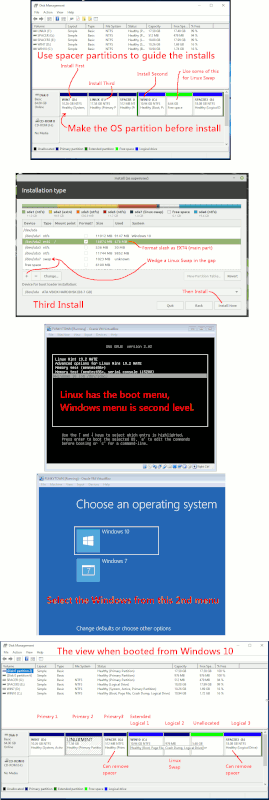
https://i.postimg.cc/0jMDV94v/Multiboot-Legacy-Partition.gif
In that example, I used spacer partitions to keep Windows "hemmed in".
This prevented the extra partitions from being used. But, this is
also a naughty practice, and prevents the automatic recovery on
Windows 10. What I did in that picture, was to please you, and
is not Best Practice.
Both schemes (GPT,MSDOS) can keep a multibooter happy.
When Windows does a "Clean Install", by booting the DVD, that
tends to mess up the boot materials. If Windows does "Upgrade Installs", today, it doesn't have to mess up the Linux materials. For piece of mind,
I'd do Win7, then Win10, then Linux. But when 21H2 or whatever for
Windows 10
comes along, there should not be an issue with Linux getting trashed.
At least on a GPT setup :-)
Macrium Reflect emergency boot CD, can do Windows boot repair. What it
cannot do, is "add files", if you did something dumb and deleted the
boot files. But what it does do, is it modifies GUIDs on partitions,
composes a new BCD menu file, and tips things upright.
Linux has a third-party boot repair, but for me, it's only worked maybe
once or twice out of all the attempts. For Linux boot repair, you'll
need your own wits to make it happen. By chrooting in and doing it (grub-install for example, or update-grub if you modified /etc/defaults/grub).
Good luck, Mr.Noob [I've only lost a couple disks full of data, doing this!!!]
[Mr.Backup is your friend when multibooting]
And there's always a Level 39 wizard out there, to put you in your place
:-)
Paul
Grumble grumble trouble in River City.
Followed https://www.howtogeek.com/74335/how-to-dual-boot-windows-7-and-windows-8/
up to "Once you click the shrink button Windows will shrink your drive. Once it has completed shrinking your partition, the Disk Manager will display this new space with a black header meaning it is an empty partition, you now need to give it a file system. To format the drive with a file system right click on the black space and select “New Simple Volume”.
So set the size then drive letter.
The format partition step of the wizard is where it goes bonkers.
After supposedly formatting, i get the wonderful killing message box: "The format did not complete successfully OK".
Most definitely *NOT* ok.
DOA, cannot put anything in second partition.
So what program can i use to fix that?
Thanks, R. Baer
* THAT is the sane way to go, and the why of my complaint.
There should be a way to fiddle an M$ install to get that (and have
the whole thing in the first of the 2 partitions).
* That is what i am familiar with and works very well.
The scheme of copy to partition for an OS, then use of a boot manager
avoids the hassle and hours of re-installing lottza programs.
* The partition sector is the worst.
ONE sector is actually used, and (to exaggerate) ten thousands of
others get to be unused and unobtanium merely because they are on the
same cylinder.
* Poor solution, i think.
More aggressive and allocation messy, is to (behind the scene) have variable start location and variable file length.
A no-byte-goes-unused scheme.
* A complete DOS environment will live happily in a WIN folder.
* The boot manager allows a copy of a configured OS to me in a
partition, avoiding need to re-install a bunch of programs.
That can save daze for a given OS.
But the eat-2-partition-per-os Micro$uck model decreases number of
OSes that can live on a drive.
On 10/7/21 11:05 PM, Robert Baer wrote:
* THAT is the sane way to go, and the why of my complaint.
There should be a way to fiddle an M$ install to get that (and have the whole thing in the first of the 2 partitions).
As far as I understand, Microsoft has not supported installing Windows in a single partition since Windows Vista.
It would be near impossible to do that on GPT, because the installerAh. So the difference is how Windows installer works with PC/BIOS/DOS partition tables vs GPT partition tables. That makes sense. If memory serves, I think that GPT became the default with Windows Vista.
has "weed-like" behavior then.
To do it on GPT, requires a sacrificial install and some cloning-over.
Which is cheating, but might still be do-able. The above procedure
was more straight-forward.
On 10/8/21 4:56 PM, Paul wrote:
It would be near impossible to do that on GPT, because the installer has "weed-like" behavior then.Ah. So the difference is how Windows installer works with PC/BIOS/DOS partition tables vs GPT partition tables. That makes sense. If memory serves, I think that GPT became the default with Windows Vista.
To do it on GPT, requires a sacrificial install and some cloning-over. Which is cheating, but might still be do-able. The above procedure was more straight-forward.
I don't know if it's cheating per se, or if it's just outsmarting Windows and making it do what you want it to do.
Aside: I wonder what the fixboot / fixmbr commands would do after such a clone.
On 10/8/2021 2:35 AM, Robert Baer wrote:Both exFAT and NTFS acted the same way; i get a new partition RAW by default.
Grumble grumble trouble in River City.
Followed
https://www.howtogeek.com/74335/how-to-dual-boot-windows-7-and-windows-8/
up to "Once you click the shrink button Windows will shrink your
drive. Once it has completed shrinking your partition, the Disk
Manager will display this new space with a black header meaning it is
an empty partition, you now need to give it a file system. To format
the drive with a file system right click on the black space and select
“New Simple Volume”.
So set the size then drive letter.
The format partition step of the wizard is where it goes bonkers.
After supposedly formatting, i get the wonderful killing message box: >> "The format did not complete successfully OK".
Most definitely *NOT* ok.
DOA, cannot put anything in second partition.
So what program can i use to fix that?
Thanks, R. Baer
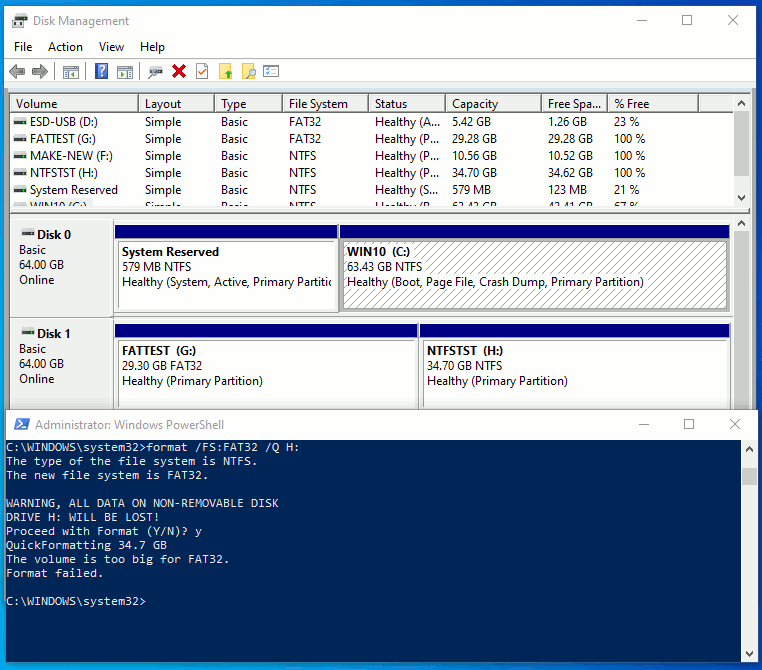
You can see in my example here, I tried to format a
partition to FAT32 when the partition was too big
for Microsofts rules to let it happen. Even though
FAT32 formats just fine up to 2.2TB in size using a
third-party tool.
https://i.postimg.cc/N0znXp3n/formatting-fail.gif
In Disk Management, you can make a new partition RAW,
then resort to command line "format" command, as in the picture.
Paul
Paul wrote:
On 10/8/2021 2:35 AM, Robert Baer wrote:Both exFAT and NTFS acted the same way; i get a new partition RAW by default.
Grumble grumble trouble in River City.
Followed
https://www.howtogeek.com/74335/how-to-dual-boot-windows-7-and-windows-8/ >>> up to "Once you click the shrink button Windows will shrink your drive. Once it has completed shrinking your partition, the Disk Manager will display this new space with a black header meaning it is an empty partition, you now need to give it a file system. To format the drive with a file system right click on the black space and select “New Simple Volume”.
So set the size then drive letter.
The format partition step of the wizard is where it goes bonkers.
After supposedly formatting, i get the wonderful killing message box: >>> "The format did not complete successfully OK".
Most definitely *NOT* ok.
DOA, cannot put anything in second partition.
So what program can i use to fix that?
Thanks, R. Baer
You can see in my example here, I tried to format a
partition to FAT32 when the partition was too big
for Microsofts rules to let it happen. Even though
FAT32 formats just fine up to 2.2TB in size using a
third-party tool.
https://i.postimg.cc/N0znXp3n/formatting-fail.gif
In Disk Management, you can make a new partition RAW,
then resort to command line "format" command, as in the picture.
Paul
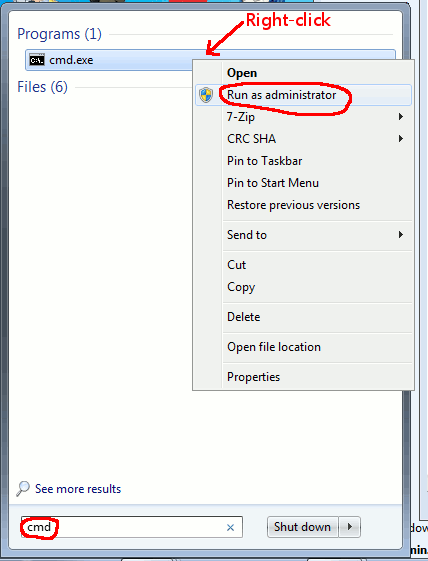
Did not try CMD, so
..seems to want to work with format N: but slow as all heck.
So tried format N: /q and got the following messages:
Creating file system structures.
The first NTFS boot sector is unreadabe.
All NTFS boot sectors are unwriteable. Cannot continue.
Format failed.
So, maybe the SLOW way or NO WAY.
Thanks.
..seems to want to work with format N: but slow as all heck.
So tried format N: /q and got the following messages:
Creating file system structures.
The first NTFS boot sector is unreadabe.
All NTFS boot sectors are unwriteable. Cannot continue.
Format failed.
So, maybe the SLOW way or NO WAY.
On 10/10/21 2:36 AM, Robert Baer wrote:
..seems to want to work with format N: but slow as all heck.
Did you let the slow format finish? Or did you stop it?
So tried format N: /q and got the following messages:
Creating file system structures.
The first NTFS boot sector is unreadabe.
All NTFS boot sectors are unwriteable. Cannot continue.
Format failed.
If you stopped the slow / long format, that error would be unsurprising to me.
So, maybe the SLOW way or NO WAY.
My understanding is that the quick / short format will only run if there is an existing file system (maybe of the same type). Something that doesn't exist if you stopped the slow / long format before it finished.
No.
On 10/10/2021 12:38 PM, Grant Taylor wrote:Well, i let the slow, long-winded "normal" format run. Over an hour
On 10/10/21 2:36 AM, Robert Baer wrote:
..seems to want to work with format N: but slow as all heck.
Did you let the slow format finish? Or did you stop it?
So tried format N: /q and got the following messages:
Creating file system structures.
The first NTFS boot sector is unreadabe.
All NTFS boot sectors are unwriteable. Cannot continue.
Format failed.
If you stopped the slow / long format, that error would be
unsurprising to me.
So, maybe the SLOW way or NO WAY.
My understanding is that the quick / short format will only run if
there is an existing file system (maybe of the same type). Something
that doesn't exist if you stopped the slow / long format before it
finished.
No.
Short format = write new $MFT, done
Long Format = write new $MFT, then read verify the entire NTFS, if any
blocks return CRC error, mark off bad clusters using $BAD
sparse metadata method.
The long format is mostly a read operation.
The short format does everything technically
needed on good media. You should not really
be resorting to "living with bad media" by
using the $BAD method. It's a false economy.
If your media is that bad, when auto-reallocation
hardware support cannot fix a CRC error, then that
disk is in trouble, and on its way out.
While it is possible to have high-fly errors on
a disk drive, and marking off the CRC errored sectors
is perfectly good, this sort of error type is uncommon.
I've only seen it once here, and just after
committing a cardinal sin of turning an old
drive upside down. That's not a good idea, but
because the drive was freezing right-side-up,
I had no choice but to try it.
*******
Back in 1985 or so, when the very first $1000+ HDD
came in (5MB and 10MB drives), if you interrupted the
format of those, they would brick on you. That's because
back then, "format" meant "low-level format" on soft
sectored drives. The magnetic format written, redefined
everything. It was truly, a nuke and pave time. There
was an index mark in hardware, to signal when to write
your soft sectors.
Modern drives, the servo wedges are "permanent". You're
not allowed to "pave" any more. You can only fill potholes
(read sector and write sector interface).
Formatting does not format, not any more. It
does not do low-level format.
Windows format, like anyones format, only has the
ability to read and write sectors. It's not really
formatting as we knew it.
You don't need a file system to exist, to write over it.
The partition can be raw. The first sector of the
partition can be all zeros (the file system type
declaration), and "format" can still write it.
If we could not do that, we could not bootstrap formatting
on brand new year 2021 disk drives from the factory.
I can do a Secure Erase on a modern drive, and partition
and format it, with no reliance on any special things
pre-existing on the disk. Since the servo wedges are permanent,
the disk is always able to orient itself and follow LBA
addressing. Everything is there and everything is locatable
by address. Even Secure Erase, only writes over the payload
section of each sector.
Paul
On 10/10/21 12:34 PM, Paul wrote:
No.
Suffice it to say that we've had different experience.
I've had many occasions when Microsoft tools would not do a /quick/ format because there was no file system. I was /forced/ to do the normal / long format.
The normal / long format has always been allowed on any type of partition.
Note: normal / long is not the same as actually doing a more thorough test.
I am also mostly speaking to the format command. Microsoft may have changed > their stance in their GUI format utilities over the years.
Well, i let the slow, long-winded "normal" format run. Over an hour or so later, i got responses:
The new file system is NTFS.
WARNING, ALL DATA ON NON-REMOVEABLE DISK DRIVE N: WILL BE LOST!
Proceed with format(Y/N)? y
Formatting 238470M
488386560 bad sectors were encountered during the format - thesse sectors cannot be guaranteed to have been cleaned/.
Volume label (32 characters, ENTER for none)? NewN
Creating file system structures.
All NTFS boot sectors are unwriteable. Cannot continue.
Format failed.
Wonderful! DOA.
Seems impossible to format that second partition.
So i deleted all that bushwah and started with the HD as one partition, simple volume,
"quick" format .. all of which takes quite a while.
That works.
So.. what the heck..Use Properties and run error checking, scan for and attempt recovery of bad sectors.
331007 free clusters processed.
Number seems slow to change, and the "progress" bar is maybe one tenth across (15 minutes so far).
..looks liker it will take hours, so signing off till done.
Will report results.
On 10/11/2021 1:34 AM, Robert Baer wrote:
Well, i let the slow, long-winded "normal" format run. Over an hour
or so later, i got responses:
The new file system is NTFS.
WARNING, ALL DATA ON NON-REMOVEABLE DISK DRIVE N: WILL BE LOST!
Proceed with format(Y/N)? y
Formatting 238470M
488386560 bad sectors were encountered during the format - thesse
sectors cannot be guaranteed to have been cleaned/.
Volume label (32 characters, ENTER for none)? NewN
Creating file system structures.
All NTFS boot sectors are unwriteable. Cannot continue.
Format failed.
Wonderful! DOA.
Seems impossible to format that second partition.
So i deleted all that bushwah and started with the HD as one
partition, simple volume,
"quick" format .. all of which takes quite a while.
That works.
So.. what the heck..Use Properties and run error checking, scan for
and attempt recovery of bad sectors.
331007 free clusters processed.
Number seems slow to change, and the "progress" bar is maybe one
tenth across (15 minutes so far).
..looks liker it will take hours, so signing off till done.
Will report results.
http://hdtune.com/files/hdtune_255.exe # 628KB
Install that, and use the Health tab to collect SMART data
about the drive in question. Use the menu near the top,
to select the drive you are trying to format.
I do two things with Hard Drives:
1) Read transfer curve, with the left-most tab.
This is a sensitive test for platter surface conditions.
The more modern the Windows OS, the harder it is to get the
OS to shut the fuck up, while you're trying to run this test.
Win2K was the best at this job. Win10 has the irritating properly,
that the instant you start the bench running, you look in Task
Manager, and Windows 10, on purpose, will fork a maintenance
task of its own.
2) Health tab, check "Reallocated" raw data column. Value should
be zero. If you see a finite number, like 123, that means
you're getting low on spare sectors. One of my drives here,
the remaining health claimed to be 5500 sectors, and you could
watch the "Reallocated" raw value grow from one day to the next
as the drive was used.
It might take five to ten minutes to do that much work.
*******
3) You can use the right-most tab to scan the surface for errors,
but you've already done that effectively several times now,
and waiting another two hours would be a bore. You know something
is wrong with this drive, then it's a question of how much time
to spend and so on.
The HDTune window misbehaves in some display managers, so if
you see some weirdness, "this is normal" for it :-)
Paul
Checking disk is still running, maybe 1/4 "done" so i would say 2-3 daze (19,xxx,xxx free clusters processed so far).
Maybe i should let it run to bitter end for a report from the process?
We are talking about a brand new drive.
Send it back?
| Sysop: | Gargoyle |
|---|---|
| Location: | Wayne, OK |
| Users: | 9 |
| Nodes: | 10 (0 / 10) |
| Uptime: | 149:01:20 |
| Calls: | 136 |
| Calls today: | 1 |
| Files: | 309 |
| Messages: | 78,952 |