• Multiple OSes on HD?

    From Robert Baer@robertbaer@localnet.com to alt.computer on Sat Oct 23 22:10:35 2021
    Is there any reason why one cannot have 4 Primary Partitions, each
    with a Win OS (XP, Win7, Win7, Win10)?
    Use simple floppy-based boot for OS selection OR the boot partition
    has the selection program?

    Thanks,
    R. Baer
    --
    This email has been checked for viruses by Avast antivirus software. https://www.avast.com/antivirus

    --- Synchronet 3.20a-Win32 NewsLink 1.114
  • From Paul@nospam@needed.invalid to alt.computer on Sun Oct 24 06:38:24 2021
    On 10/24/2021 1:10 AM, Robert Baer wrote:
      Is there any reason why one cannot have 4 Primary Partitions, each with a Win OS (XP, Win7, Win7, Win10)?
      Use simple floppy-based boot for OS selection OR the boot partition has the selection program?

       Thanks,
    R. Baer


    Can be done.

    Set the BIOS SATA port to the non-AHCI setting,
    as otherwise, the four OSes can't play nice together.

    To do a SATA AHCI install for WinXP, requires pressing
    F6 early on and presenting a txtsetup.oem class floppy diskette.
    WinXP has no "MSAHCI" driver built-in like the other OSes do.

    And that's why you have to make an intelligent choice for
    disk operating mode, before the project starts. Lots of
    my installed OSes here, are already AHCI, which would
    complicate making the project disk in this case. If the
    machine was brand new, and no other OSes had ever been
    installed, I could select the non-AHCI choice in the BIOS
    and all of the listed OSes should be happy with that.

    AHCI supports tagged command queuing, which means commands
    can be completed by the disk drive out of order. This only
    pays off, if the "disk queue" grows, which may not be
    the case in light usage of a PC. Only a server application
    has a consistent disk queue, 24 hours a day.

    Install

    WinXP first
    Win7 second
    Win8 next
    Win10 next

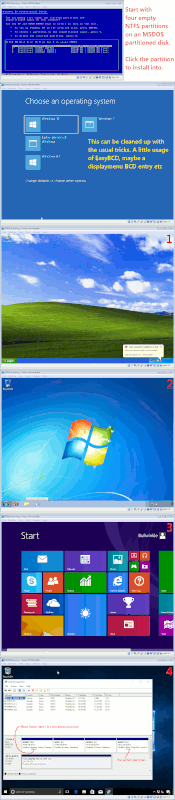
    I created four primary partitions, all NTFS, before I started.
    Used Custom in the installer, clicked on the partition
    I wanted it to use for the C: in that case.

    The BCD file that the last three use, should have
    options for chain loading the WinXP OS.

    Your WinXP might not have a "skip" button for skipping
    past the license key entry. Look around for something
    suited to passing key validation (but not suited to
    actual activation when install is finished). You might
    have to use material from here, to pass the key entry step
    of the WinXP SP3 disc.

    https://gist.github.com/denizssch/72ec2aa1c5d0a84ffb57076f7dbf30d6

    Win7 should have a "skip" button.

    Win8 needs an install-only key, as it has no "skip",
    but there are some known install-only keys available.
    At one time, I tested that one of these worked, and I
    replaced the key with the purchased key later and it
    activated OK with my purchased key. Using a fake key
    at first, doesn't hurt the eventual disposition of the
    OS.

    Windows 8.0 Pro: XKY4K-2NRWR-8F6P2-448RF-CRYQH
    Windows 8.0 Core: FB4WR-32NVD-4RW79-XQFWH-CYQG3 # Core = "Home"

    Windows 8.1 Pro: XHQ8N-C3MCJ-RQXB6-WCHYG-C9WKB
    Windows 8.1 Core: 334NH-RXG76-64THK-C7CKG-D3VPT # Core = "Home"

    Win10 has a "skip" key.

    As a result, there should be enough materials to do it.

    The only gating issue then, is deciding what to do with
    the SATA interface setting. If you had a SCSI drive on a
    Perc, who knows, it might work with no intervention
    whatsoever :-)

    Naturally, the project is also gated by meeting the
    hardware requirements of all OSes. If the machine does
    not meet Win10 instruction set requirements, then it's
    not going to install.

    If you use your "spacer" partitions wisely, all the
    OSes can be convinced to use exactly one partition
    each. If the partition table is full at the start,
    the Installer behavior is quite tame (for a change).

    [Picture]

    https://i.postimg.cc/RZK0nD1M/four-os-setup.gif

    By not giving the OSes the partitions they want:

    1) Bitlocker FDE doesn't work right. A separate partition
    is used, so C: can be encrypted. The partition with the
    BCD file on it, is unencrypted (so the machine can boot).

    2) ReagentC won't work right. If ReagentC WinRE.wim is kept
    on a separate partition, that makes it easier for the
    modern OSes to repair themselves. If C: is corrupted and
    it is the only partition, then the WinRE.wim would be
    inaccessible.

    Paul
    --- Synchronet 3.20a-Win32 NewsLink 1.114
  • From Robert Baer@robertbaer@localnet.com to alt.computer on Tue Oct 26 01:24:31 2021
    Paul wrote:
    On 10/24/2021 1:10 AM, Robert Baer wrote:
       Is there any reason why one cannot have 4 Primary Partitions, each
    with a Win OS (XP, Win7, Win7, Win10)?
       Use simple floppy-based boot for OS selection OR the boot partition
    has the selection program?

        Thanks,
    R. Baer


    Can be done.

    Set the BIOS SATA port to the non-AHCI setting,
    as otherwise, the four OSes can't play nice together.

    To do a SATA AHCI install for WinXP, requires pressing
    F6 early on and presenting a txtsetup.oem class floppy diskette.
    WinXP has no "MSAHCI" driver built-in like the other OSes do.

    And that's why you have to make an intelligent choice for
    disk operating mode, before the project starts. Lots of
    my installed OSes here, are already AHCI, which would
    complicate making the project disk in this case. If the
    machine was brand new, and no other OSes had ever been
    installed, I could select the non-AHCI choice in the BIOS
    and all of the listed OSes should be happy with that.

    AHCI supports tagged command queuing, which means commands
    can be completed by the disk drive out of order. This only
    pays off, if the "disk queue" grows, which may not be
    the case in light usage of a PC. Only a server application
    has a consistent disk queue, 24 hours a day.

    Install

       WinXP first
       Win7 second
       Win8 next
       Win10 next

    I created four primary partitions, all NTFS, before I started.
    Used Custom in the installer, clicked on the partition
    I wanted it to use for the C: in that case.

    The BCD file that the last three use, should have
    options for chain loading the WinXP OS.

    Your WinXP might not have a "skip" button for skipping
    past the license key entry. Look around for something
    suited to passing key validation (but not suited to
    actual activation when install is finished). You might
    have to use material from here, to pass the key entry step
    of the WinXP SP3 disc.

    https://gist.github.com/denizssch/72ec2aa1c5d0a84ffb57076f7dbf30d6

    Win7 should have a "skip" button.

    Win8 needs an install-only key, as it has no "skip",
    but there are some known install-only keys available.
    At one time, I tested that one of these worked, and I
    replaced the key with the purchased key later and it
    activated OK with my purchased key. Using a fake key
    at first, doesn't hurt the eventual disposition of the
    OS.

       Windows 8.0 Pro:   XKY4K-2NRWR-8F6P2-448RF-CRYQH
       Windows 8.0 Core:  FB4WR-32NVD-4RW79-XQFWH-CYQG3     # Core = "Home"

       Windows 8.1 Pro:   XHQ8N-C3MCJ-RQXB6-WCHYG-C9WKB
       Windows 8.1 Core:  334NH-RXG76-64THK-C7CKG-D3VPT     # Core = "Home"

    Win10 has a "skip" key.

    As a result, there should be enough materials to do it.

    The only gating issue then, is deciding what to do with
    the SATA interface setting. If you had a SCSI drive on a
    Perc, who knows, it might work with no intervention
    whatsoever :-)

    Naturally, the project is also gated by meeting the
    hardware requirements of all OSes. If the machine does
    not meet Win10 instruction set requirements, then it's
    not going to install.

    If you use your "spacer" partitions wisely, all the
    OSes can be convinced to use exactly one partition
    each. If the partition table is full at the start,
    the Installer behavior is quite tame (for a change).

      [Picture]

      https://i.postimg.cc/RZK0nD1M/four-os-setup.gif

    By not giving the OSes the partitions they want:

    1) Bitlocker FDE doesn't work right. A separate partition
       is used, so C: can be encrypted. The partition with the
       BCD file on it, is unencrypted (so the machine can boot).

    2) ReagentC won't work right. If ReagentC WinRE.wim is kept
       on a separate partition, that makes it easier for the
       modern OSes to repair themselves. If C: is corrupted and
       it is the only partition, then the WinRE.wim would be
       inaccessible.

     Paul
    Thanks!
    Looks easier than I thought.
    --
    This email has been checked for viruses by Avast antivirus software. https://www.avast.com/antivirus

    --- Synchronet 3.20a-Win32 NewsLink 1.114