On 12/10/2021 5:32 PM, Robert Baer wrote:
The two major programs found were:
1) Digital TV tuner device registration application
2) Widows Media Center store update manager
#1 bothers me, because i used it many years ago with Windows 2000 and never installed or used it since.
Hell, even the hardware got scrapped way back then.
Searches on hard drives do not find even hints of the program or related items.
So, what can I do to eliminate this program?
#2: I do not need or want a stupid "store" and obviously an update manager.
I use VLC on rare occasions, and have not used the Widows Media Center since Windows 2000.
If I uninstalled WMC, would that fix that problem?
Thanks.
Can you add an exception for the items ?
Usually, when an item is detected, you have several options
concerning disposition.
For example, I can add an exception, to stop scanning my email folder,
which slows down email operation. Now, that's dangerous, because
an attachment could be infected. It's a prime attack surface. But if
it slows things down too much, I might as well throw a brick through
the screen.
The item in #1, could be inside a .msi file stored in C:\Windows\Installer.
The store update manager (whatever that is), should be a Microsoft
file, and the checksum should be known (acquired from an uninfected install). That suggests there is a small chance, that it isn't what it is claimed to
be. But that's a small chance.
Windows Media Center, includes things like media descriptions for CD titles. There might have been some settings, for it to go to the Internet and
look up info on a new title you added to the machine. This information
could be cached somewhere. And that might be part of the mission of the
store update manager. WMC has been around long enough, to have way more functions than just displaying or playing stuff. It can even "serve"
content, as if it was a multimedia streaming server. Your own Youtube
in a sense.
I'm surprised these "detections", whether false or not, do not include
a file path.
You can also scan with an offline scanner, like a Bitdefender CD. And
see if that will give a path. Assuming it even sees the issue.
The Bitdefender CD is discontinued, so this could be interesting.
https://www.majorgeeks.com/files/details/bitdefender_rescuecd.html
http://download.bitdefender.com/rescue_cd/bitdefender-rescue-cd.iso # Nope, it's gone
# slow response here. Took two minutes to start. 250KB/sec.
https://web.archive.org/web/20190929062112/http://download.bitdefender.com/rescue_cd/bitdefender-rescue-cd.iso
It's a well known fact, that if you serve files slowly, people will
"go away". I wonder if that's true. Let's see... <drums fingers on
table a bit more>. Nope. I'm still downloading it.
In fact, I'm going to see if I have a copy already. These are my copies.
2010 327,068 KB
2014 526,048 KB
2015 651,264 KB
2017 683,008 KB
Whereas the last one is supposed to be 832,000 or so.
It's a Gentoo CD. I wasn't able to spot the scanner executable.
I crawled around the squashfs a bit. 47 minutes remaining
on the download <drums finders on the table a bit more>.
The AV definitions total 274,769,619 bytes and
their server is still serving the signature file.
That's what I wanted to check. I ran the 2017 and it
contacted the server OK. So that's 832000 for the CD
and 274770 for the definitions (at 5KB/sec). It
will take 274770/5=54954 seconds or 15 hours for
the scanner to be "ready". Hah! You cannot stop me,
you bozos <drums fingers on table>. OK, the speed picked up.
My stubbornness is paying off. If's possible the definitions
coming into the 2017 version, will finish before the
"last version" download.
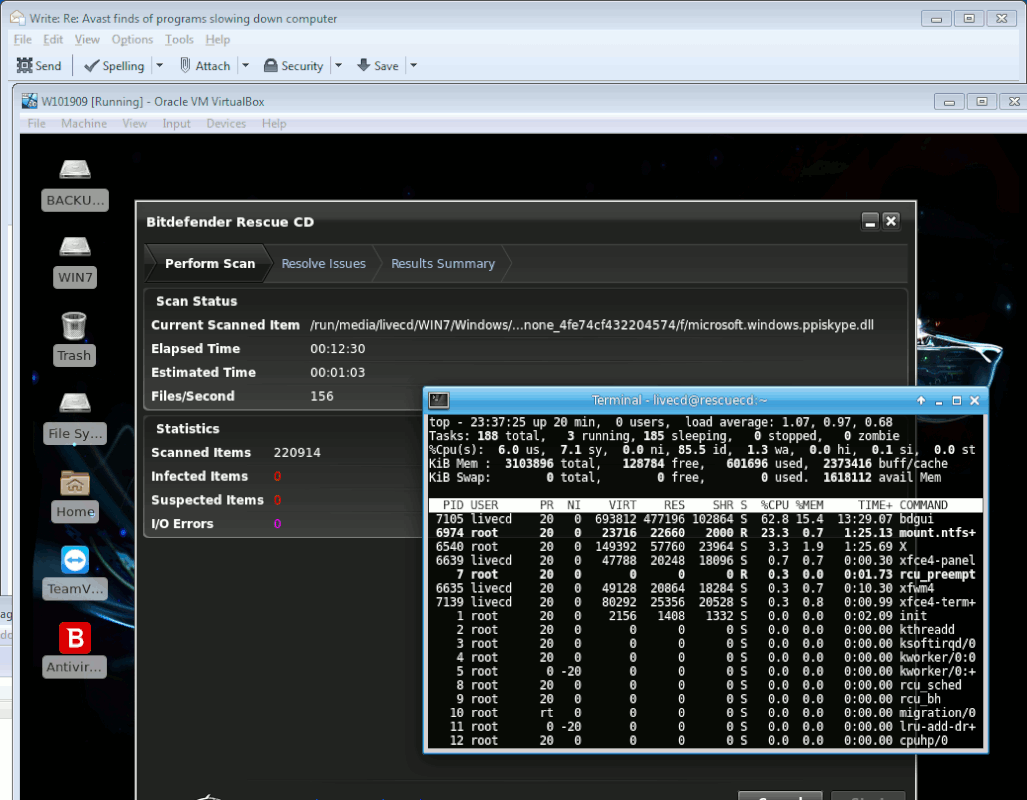
"bdgui" is doing the scanning. I can see it in "top"
running in XFCE terminal.
[Picture]
https://i.postimg.cc/tRtm42mN/off-and-running.gif
*******
There's been a shakeup in the AV industry. A lot of
mergers and acquisitions. This usually means declining
revenue, a lot of buy and crush activity. Perhaps Microsoft
giving away an AV with their Windows 10, had an impact after all.
All the AV products whose names begin with the letter "A"
are now owned by one company.
Paul
--- Synchronet 3.20a-Win32 NewsLink 1.114