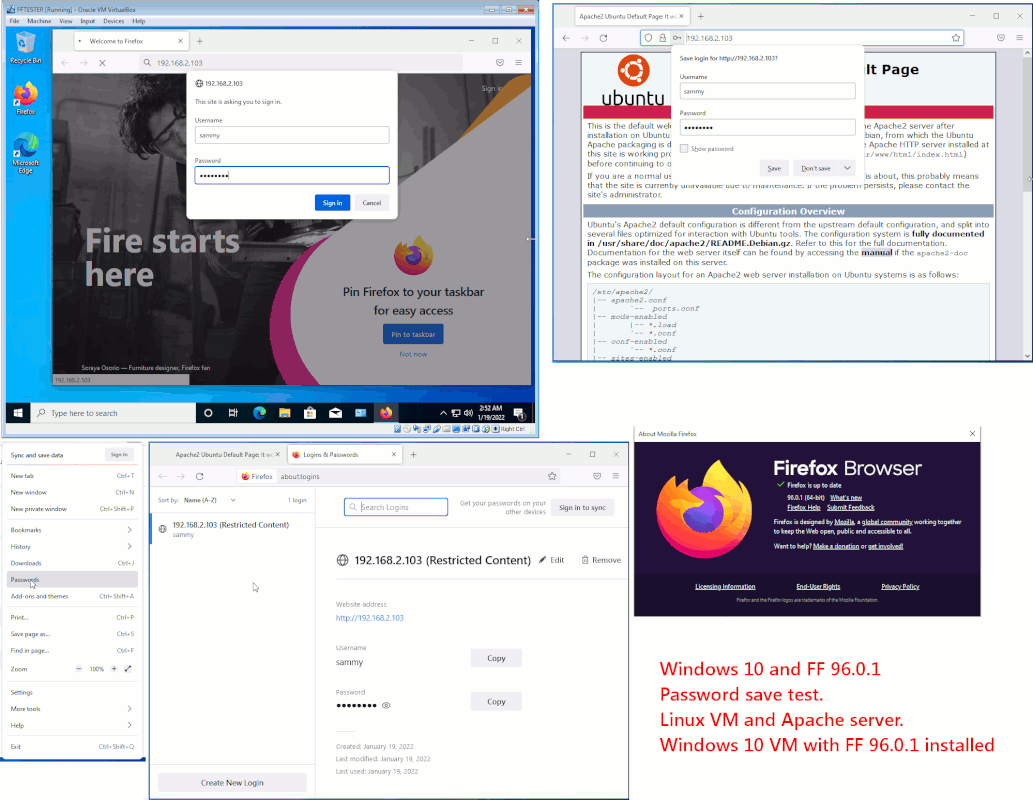
• FireFox password management

    From Robert Baer@robertbaer@localnet.com to alt.computer on Sun Jan 16 16:51:59 2022
    See no way to do that in FF 96.0.
    Follow Mozilla instructions and do NOT get the expected list of
    prog name, user name, password.
    So, how in the heck can do any password management?

    Thanks.
    --- Synchronet 3.20a-Win32 NewsLink 1.114
  • From Paul@nospam@needed.invalid to alt.computer on Sun Jan 16 20:37:34 2022
    On 1/16/2022 7:51 PM, Robert Baer wrote:
      See no way to do that in FF 96.0.
      Follow Mozilla instructions and do NOT get the expected list of
    prog name, user name, password.
      So, how in the heck can do any password management?

       Thanks.

    Do you mean, instructions like this ?

    https://support.mozilla.org/en-US/kb/password-manager-remember-delete-edit-logins#firefox:win7:fx96

    They include mention of means to disable the feature.
    Make sure those disabling controls are not messing with you.

    It says that using "Private Browsing Mode" continuously, disabled
    the feature. The purpose of Private Browsing is not to leave
    any trace of your activity, and that includes recording
    passwords to porno sites. That's why they disable it.

    The article also says:

    about:logins

    should open the password management page. But you can
    have items stored in there, and if the feature and those
    tick boxes depicted on the instruction page are not
    ticked, then it won't do anything.

    There's really a lot of helpful hints there.

    Paul
    --- Synchronet 3.20a-Win32 NewsLink 1.114
  • From Robert Baer@robertbaer@localnet.com to alt.computer on Sun Jan 16 22:10:23 2022
    Paul wrote:
    On 1/16/2022 7:51 PM, Robert Baer wrote:
       See no way to do that in FF 96.0.
       Follow Mozilla instructions and do NOT get the expected list of
    prog name, user name, password.
       So, how in the heck can do any password management?

        Thanks.

    Do you mean, instructions like this ?

    https://support.mozilla.org/en-US/kb/password-manager-remember-delete-edit-logins#firefox:win7:fx96
    * yes, that is one; the select that first one "Make Firefox remember
    usernames and passwords". Scroll down to "Click the menu Fx57Menu button
    and select Passwords" [[results of cut and paste]].
    See my comment below.


    They include mention of means to disable the feature.
    Make sure those disabling controls are not messing with you.

    It says that using "Private Browsing Mode" continuously, disabled
    the feature. The purpose of Private Browsing is not to leave
    any trace of your activity, and that includes recording
    passwords to porno sites. That's why they disable it.

    The article also says:

       about:logins
    * They say to manage passwords, click on the triple bar icon, then click on/select passwords and then one will get about:passwords.
    Well, one no longer gets that list of passwords

    should open the password management page. But you can
    have items stored in there, and if the feature and those
    tick boxes depicted on the instruction page are not
    ticked, then it won't do anything.

    There's really a lot of helpful hints there.
    * hints that no longer work.


       Paul

    Thanks.
    --- Synchronet 3.20a-Win32 NewsLink 1.114
  • From Paul@nospam@needed.invalid to alt.computer on Mon Jan 17 06:54:12 2022
    On 1/17/2022 1:10 AM, Robert Baer wrote:
    Paul wrote:
    On 1/16/2022 7:51 PM, Robert Baer wrote:
       See no way to do that in FF 96.0.
       Follow Mozilla instructions and do NOT get the expected list of
    prog name, user name, password.
       So, how in the heck can do any password management?

        Thanks.

    Do you mean, instructions like this ?

    https://support.mozilla.org/en-US/kb/password-manager-remember-delete-edit-logins#firefox:win7:fx96
    * yes, that is one; the select that first one "Make Firefox remember usernames and passwords". Scroll down to "Click the menu Fx57Menu button and select Passwords" [[results of cut and paste]].
      See my comment below.


    They include mention of means to disable the feature.
    Make sure those disabling controls are not messing with you.

    It says that using "Private Browsing Mode" continuously, disabled
    the feature. The purpose of Private Browsing is not to leave
    any trace of your activity, and that includes recording
    passwords to porno sites. That's why they disable it.

    The article also says:

        about:logins
    * They say to manage passwords, click on the triple bar icon, then click on/select passwords and then one will get about:passwords.
      Well, one no longer gets that list of passwords

    should open the password management page. But you can
    have items stored in there, and if the feature and those
    tick boxes depicted on the instruction page are not
    ticked, then it won't do anything.

    There's really a lot of helpful hints there.
    * hints that no longer work.


        Paul

       Thanks.

    Works here.

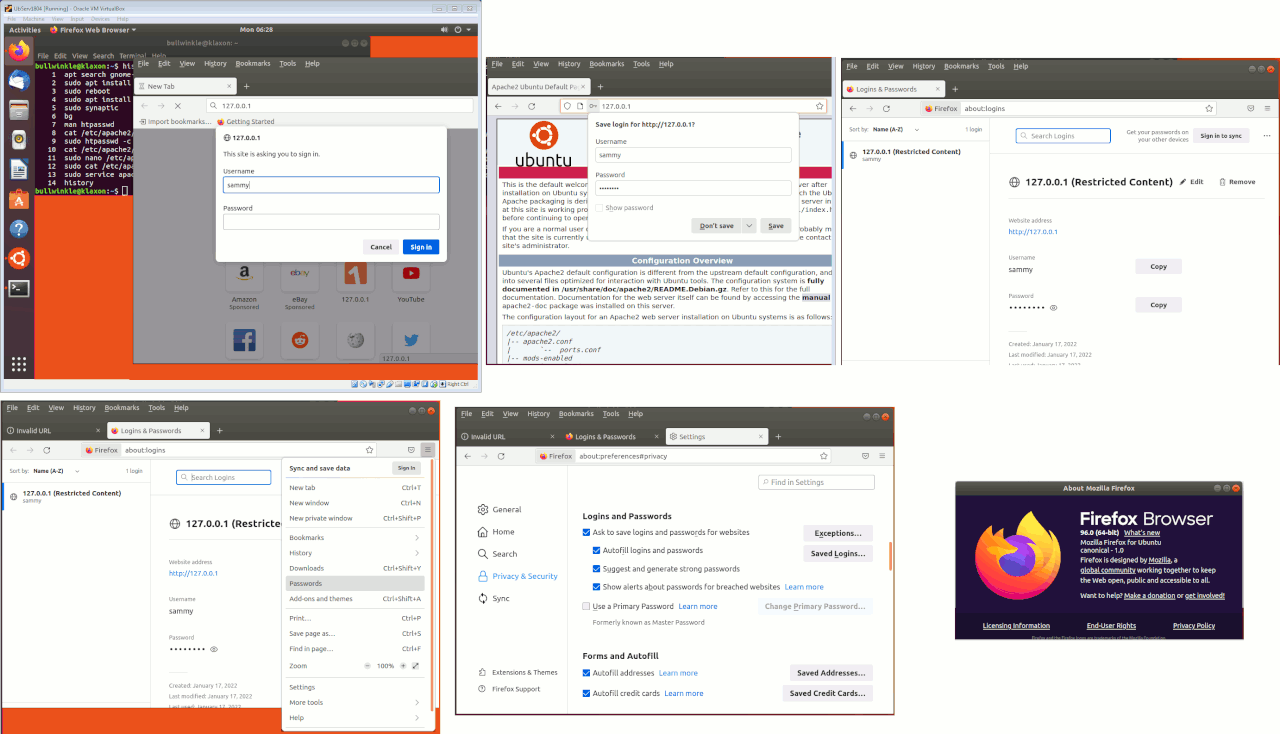
    How I tested:

    Ubuntu Server, gnome-desktop, apache2, VirtualBox session, screenshots

    Results:

    [Picture] If empty picture frame shows, right click and "Reload image"

    https://i.postimg.cc/PJZFnYmD/FF96-saves-my-password.gif

    Paul
    --- Synchronet 3.20a-Win32 NewsLink 1.114
  • From Robert Baer@robertbaer@localnet.com to alt.computer on Tue Jan 18 20:56:22 2022
    Paul wrote:
    On 1/17/2022 1:10 AM, Robert Baer wrote:
    Paul wrote:
    On 1/16/2022 7:51 PM, Robert Baer wrote:
       See no way to do that in FF 96.0.
       Follow Mozilla instructions and do NOT get the expected list of
    prog name, user name, password.
       So, how in the heck can do any password management?

        Thanks.

    Do you mean, instructions like this ?

    https://support.mozilla.org/en-US/kb/password-manager-remember-delete-edit-logins#firefox:win7:fx96

    * yes, that is one; the select that first one "Make Firefox remember
    usernames and passwords". Scroll down to "Click the menu Fx57Menu
    button and select Passwords" [[results of cut and paste]].
       See my comment below.


    They include mention of means to disable the feature.
    Make sure those disabling controls are not messing with you.

    It says that using "Private Browsing Mode" continuously, disabled
    the feature. The purpose of Private Browsing is not to leave
    any trace of your activity, and that includes recording
    passwords to porno sites. That's why they disable it.

    The article also says:

        about:logins
    * They say to manage passwords, click on the triple bar icon, then
    click on/select passwords and then one will get about:passwords.
       Well, one no longer gets that list of passwords

    should open the password management page. But you can
    have items stored in there, and if the feature and those
    tick boxes depicted on the instruction page are not
    ticked, then it won't do anything.

    There's really a lot of helpful hints there.
    * hints that no longer work.


        Paul

        Thanks.

    Works here.

    How I tested:

       Ubuntu Server, gnome-desktop, apache2, VirtualBox session, screenshots

    Results:

       [Picture]  If empty picture frame shows, right click and "Reload image"

       https://i.postimg.cc/PJZFnYmD/FF96-saves-my-password.gif

      Paul
    Maybe because Linux is involved?

    Thanks.

    --- Synchronet 3.20a-Win32 NewsLink 1.114
  • From Paul@nospam@needed.invalid to alt.computer on Wed Jan 19 00:12:16 2022
    On 1/18/2022 11:56 PM, Robert Baer wrote:
    Paul wrote:
    On 1/17/2022 1:10 AM, Robert Baer wrote:
    Paul wrote:
    On 1/16/2022 7:51 PM, Robert Baer wrote:
       See no way to do that in FF 96.0.
       Follow Mozilla instructions and do NOT get the expected list of >>>>> prog name, user name, password.
       So, how in the heck can do any password management?

        Thanks.

    Do you mean, instructions like this ?

    https://support.mozilla.org/en-US/kb/password-manager-remember-delete-edit-logins#firefox:win7:fx96

    * yes, that is one; the select that first one "Make Firefox remember usernames and passwords". Scroll down to "Click the menu Fx57Menu button and select Passwords" [[results of cut and paste]].
       See my comment below.


    They include mention of means to disable the feature.
    Make sure those disabling controls are not messing with you.

    It says that using "Private Browsing Mode" continuously, disabled
    the feature. The purpose of Private Browsing is not to leave
    any trace of your activity, and that includes recording
    passwords to porno sites. That's why they disable it.

    The article also says:

        about:logins
    * They say to manage passwords, click on the triple bar icon, then click on/select passwords and then one will get about:passwords.
       Well, one no longer gets that list of passwords

    should open the password management page. But you can
    have items stored in there, and if the feature and those
    tick boxes depicted on the instruction page are not
    ticked, then it won't do anything.

    There's really a lot of helpful hints there.
    * hints that no longer work.


        Paul

        Thanks.

    Works here.

    How I tested:

        Ubuntu Server, gnome-desktop, apache2, VirtualBox session, screenshots

    Results:

        [Picture]  If empty picture frame shows, right click and "Reload image"

        https://i.postimg.cc/PJZFnYmD/FF96-saves-my-password.gif

       Paul
      Maybe because Linux is involved?

      Thanks.

    The password container should work the same on both versions.

    FOSS software tries to work on cross-platform subsystems.
    For example, OpenGL is common to both Windows and Linux,
    whereas DirectX3D is not.

    While some browsers rely on the Windows SChannel, Firefox might
    be one of the browsers that brings its own crypto support to even
    out the difference in subsystems between platforms.

    The developers *hate* coding if/then/else for umpteen different
    OSes, and as much as they can they try to use code that works
    anywhere.

    AFAIK, there are a couple cross-platform packaging environments.
    One of them would be Qt, such as Qt4 or Qt5. This allows multiplatform
    support for thir-party programs. You can write for Linux and it runs on Windows, and the Qt support files make up the difference. The impact
    of that is, instead of a program being a 0.5MB download, it's around
    a 100MB download. Just the internationalization code might be a 20MB
    DLL.

    I tested on Linux, because in Windows Features, it was not apparent
    that a copy of IIS web server was present, so I just decided to do
    the whole experiment in a Linux VM instead. As Apache was available
    there, and it produces the Apache test page as soon as you install it.
    Then, all I have to do is turn on password authentication, to get
    a password storage response from Firefox. That's why I did it that way.

    I think I can run two VMs, and load FF96 into a Windows OS there, but I really don't see a reason the response will be different. Linux could have
    a firewall loaded, and to get the http://127.0.0.1:80 web server to
    respond on the Linux VM, I might need to check that the firewall is
    not blocking it.

    So when you run your FF96, do you see the same sorts of
    prompts I'm seeing in the picture ?

    The files in the profile, the version of those changes from
    release to release. The migration logic should drag the materials
    from the old version to the new version. I don't know if the FF logic
    is clever enough to delete the junk once that is done. This involves
    a numbered file, like a "cert8" or the like. They put a number after
    some of the files, as a means to demonstrate which API they follow.
    If you lost your passwords, that might be an explanation. But as far
    as eliciting a response (the "Save this password" dialog), that
    should follow the Preferences tick boxes.

    Paul
    --- Synchronet 3.20a-Win32 NewsLink 1.114
  • From Paul@nospam@needed.invalid to alt.computer on Wed Jan 19 03:12:17 2022
    On 1/19/2022 12:12 AM

       Maybe because Linux is involved?

       Thanks.

    The same test results in a Win10 VM.

    [Picture] Right-click empty frame and select "Reload picture" to see picture

    https://i.postimg.cc/qRnm0S5m/Win10-FF96-Password-Save-Test.gif

    Paul
    --- Synchronet 3.20a-Win32 NewsLink 1.114