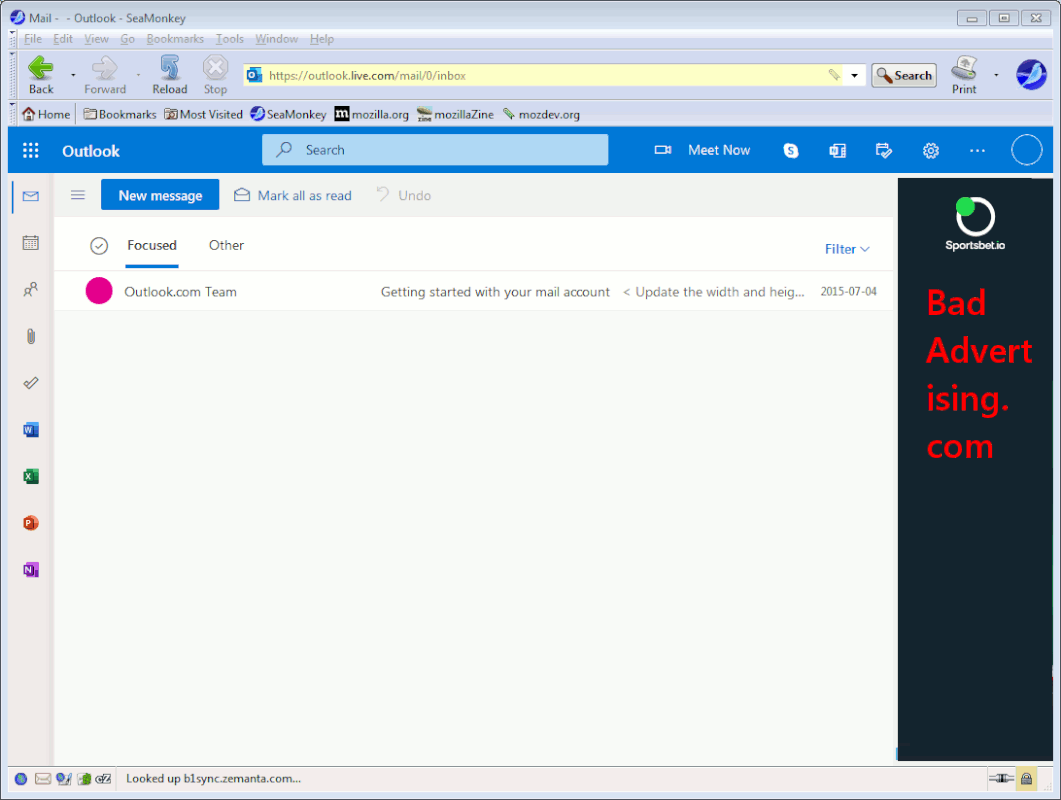
Until yesterday, i had to log in, then i got Outlook with on left side a typical email menu, then a column in middle with list of emails, then one selected email; exactly like i want the presentation to be.
Now, i do not have to log in, and the left column has icons: envelope icon (mail), then one selected email), calendar icon (calendar), people icon (people), paper clip icon (files), checkmark icon (to do), and 3 horizontal dot icon (gives square whitespace that is non-functonal); middle with list of emails, then right column with one selected email.
How in the heck do i change the presentation back?
Thanks.
(PS: i like that auto login bit)
On 1/16/2022 8:27 PM, Robert Baer wrote:* No.
Until yesterday, i had to log in, then i got Outlook with on left
side a typical email menu, then a column in middle with list of
emails, then one selected email; exactly like i want the presentation
to be.
Now, i do not have to log in, and the left column has icons:
envelope icon (mail), then one selected email), calendar icon
(calendar), people icon (people), paper clip icon (files), checkmark
icon (to do), and 3 horizontal dot icon (gives square whitespace that
is non-functonal); middle with list of emails, then right column with
one selected email.
How in the heck do i change the presentation back?
Thanks.
(PS: i like that auto login bit)
Do you think the OS version has changed, or
just the version of your unstated email tool ?
Microsoft Account Login implies many things.
Note that the gmail.com interface (in Firefox as webmail)
has changed, it seems to use a cookie for authentication, and
I don't know how long the cookie lasts, before you have to type
your password again in that case. The gmail changes may have
inspired Microsoft to copy them
winver.exe # tells you the OS version
File Explorer on C: and look for the existence of
Windows.old, tells you whether the OS was upgraded
recently (swacked). The generally don't gratuitously
change OS versions on you, but there has been one report
where a user swears they did not touch an interface offering
to upgrade the OS, and it upgraded anyway.
You're painting us a picture in your post, of a "something happened",
but you haven't given enough detail to say where we are:
1) Windows 10 Mail application (terrible!)
2) MSO and Outlook <versionnumber> for mail* I am using online version of Microsoft 365 Office
3) Doing webmail in Firefox.* No.
Paul
Paul wrote:
On 1/16/2022 8:27 PM, Robert Baer wrote:* No.
Until yesterday, i had to log in, then i got Outlook with on left side a typical email menu, then a column in middle with list of emails, then one selected email; exactly like i want the presentation to be.
Now, i do not have to log in, and the left column has icons: envelope icon (mail), then one selected email), calendar icon (calendar), people icon (people), paper clip icon (files), checkmark icon (to do), and 3 horizontal dot icon (gives square whitespace that is non-functonal); middle with list of emails, then right column with one selected email.
How in the heck do i change the presentation back?
Thanks.
(PS: i like that auto login bit)
1) Windows 10 Mail application (terrible!)
I do not use Win 10. Using Win 7 SP1.
2) MSO and Outlook <versionnumber> for mail* I am using online version of Microsoft 365 Office
(Outlook).
3) Doing webmail in Firefox.* No.
Login URL is (split by NG program): https://sso.godaddy.com/?app=o365&realm=pass&username=
Until yesterday, i had to log in, then i got Outlook with on leftI discovered how to login to Microsoft.com directly, instead of using sso.godaddy.com › login.
side a typical email menu, then a column in middle with list of emails,
then one selected email; exactly like i want the presentation to be.
Now, i do not have to log in, and the left column has icons: envelope icon (mail), then one selected email), calendar icon (calendar), people
icon (people), paper clip icon (files), checkmark icon (to do), and 3 horizontal dot icon (gives square whitespace that is non-functonal);
middle with list of emails, then right column with one selected email.
How in the heck do i change the presentation back?
Thanks.
(PS: i like that auto login bit)
| Sysop: | Gargoyle |
|---|---|
| Location: | Wayne, OK |
| Users: | 9 |
| Nodes: | 10 (0 / 10) |
| Uptime: | 149:01:54 |
| Calls: | 136 |
| Calls today: | 1 |
| Files: | 309 |
| Messages: | 78,952 |