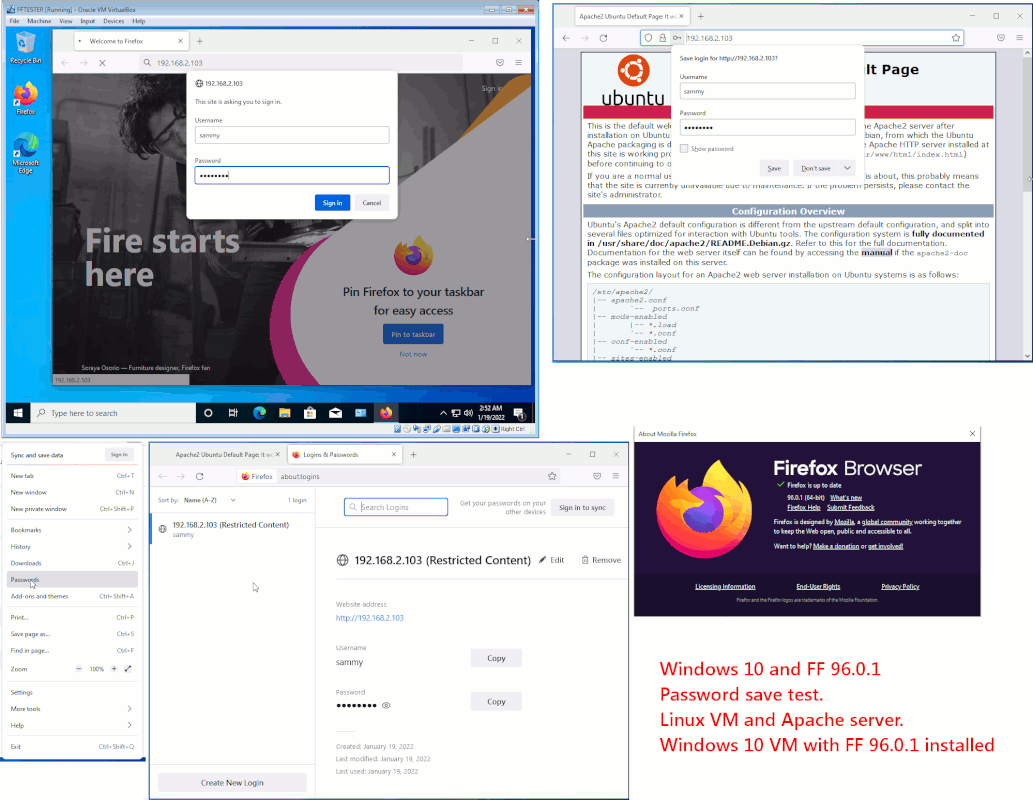
On 1/19/2022 12:12 AMFireFox 96.0 in Win7.1 does not save passwords, and for some sites
Maybe because Linux is involved?
Thanks.
The same test results in a Win10 VM.
[Picture] Right-click empty frame and select "Reload picture" to
see picture
https://i.postimg.cc/qRnm0S5m/Win10-FF96-Password-Save-Test.gif
Paul
Paul wrote:
On 1/19/2022 12:12 AMFireFox 96.0 in Win7.1 does not save passwords, and for some sites does not even save user names.
Maybe because Linux is involved?
Thanks.
The same test results in a Win10 VM.
[Picture] Right-click empty frame and select "Reload picture" to see picture
https://i.postimg.cc/qRnm0S5m/Win10-FF96-Password-Save-Test.gif
Paul
It also seems that the online "help" avoids that fact.
So, how far back does one need to go (ie: what version) to get a FireFox that does work properly?
Thanks.
On 1/29/2022 12:31 AM, Robert Baer wrote:
Paul wrote:
On 1/19/2022 12:12 AMFireFox 96.0 in Win7.1 does not save passwords, and for some sites
Maybe because Linux is involved?
Thanks.
The same test results in a Win10 VM.
[Picture] Right-click empty frame and select "Reload picture" to >>> see picture
https://i.postimg.cc/qRnm0S5m/Win10-FF96-Password-Save-Test.gif
Paul
does not even save user names.
It also seems that the online "help" avoids that fact.
So, how far back does one need to go (ie: what version) to get a
FireFox that does work properly?
Thanks.
In your view, how would the OS influence the outcome
of an event which is private to the software (Firefox) ?
The passwords don't pass through the OS. The SChannel is
occasionally used for crypto, but if it were used (which it
probably isn't), it would only be used for datapath (https
transmission). The password level is too far removed
from the OS, for the OS to be the issue. If the passwords
were "coming from User Accounts", again it would be a different
matter, but the passwords have nothing to do with User Accounts
in the OS.
The only thing I can suggest, is a disagreement about
the file contents of the Profile folder that Firefox is
currently using.
Profiles are "migrated", each time that Firefox is upgraded.
This includes (very occasionally) adding a new database
file for things like passwords. Any time the API changes,
the version number at the end of the filename changes.
Like "cert8" or similar. The files used consist of a name
with a number on the end, and the number is a hint as to
which API level it is at.
You also claim a level of inconsistency, almost as if the
password file is corrupted somehow.
I would create a new profile, and retest.
Firefox has a Profile Manager. Create a new profile and retest.
Switch back to your old profile, to access your Bookmarks.
You can Export Bookmarks and Import them, if you need some
information preservation.
https://support.mozilla.org/en-US/kb/profile-manager-create-remove-switch-firefox-profiles
PaulWell, in essence, nothing works.
Paul wrote:
On 1/29/2022 12:31 AM, Robert Baer wrote:Well, in essence, nothing works.
Paul wrote:
On 1/19/2022 12:12 AMFireFox 96.0 in Win7.1 does not save passwords, and for some sites does not even save user names.
Maybe because Linux is involved?
Thanks.
The same test results in a Win10 VM.
[Picture] Right-click empty frame and select "Reload picture" to see picture
https://i.postimg.cc/qRnm0S5m/Win10-FF96-Password-Save-Test.gif >>>>
Paul
It also seems that the online "help" avoids that fact.
So, how far back does one need to go (ie: what version) to get a FireFox that does work properly?
Thanks.
In your view, how would the OS influence the outcome
of an event which is private to the software (Firefox) ?
The passwords don't pass through the OS. The SChannel is
occasionally used for crypto, but if it were used (which it
probably isn't), it would only be used for datapath (https
transmission). The password level is too far removed
from the OS, for the OS to be the issue. If the passwords
were "coming from User Accounts", again it would be a different
matter, but the passwords have nothing to do with User Accounts
in the OS.
The only thing I can suggest, is a disagreement about
the file contents of the Profile folder that Firefox is
currently using.
Profiles are "migrated", each time that Firefox is upgraded.
This includes (very occasionally) adding a new database
file for things like passwords. Any time the API changes,
the version number at the end of the filename changes.
Like "cert8" or similar. The files used consist of a name
with a number on the end, and the number is a hint as to
which API level it is at.
You also claim a level of inconsistency, almost as if the
password file is corrupted somehow.
I would create a new profile, and retest.
Firefox has a Profile Manager. Create a new profile and retest.
Switch back to your old profile, to access your Bookmarks.
You can Export Bookmarks and Import them, if you need some
information preservation.
https://support.mozilla.org/en-US/kb/profile-manager-create-remove-switch-firefox-profiles
Paul
Tried it all (restart, refresh, profile).
Installed FireFox 80. Same problems.
Now get:
** COPY **
Secure Connection Failed
** END COPY **
for almost every URL that used to work.
For one site, i get there and try to login, and get:
** COPY **
Access Denied
You are unauthorized to access this resource.
Reference ID is: d14b2c2729
** END COPY **
In fact, a URL that worked an hour ago now gives me the URL message.
This funnybusiness is a bunch of crap.
Is my Win7.1 getting corrupted?
Thanks.
Now
On 1/30/2022 4:26 AM, Robert Baer wrote:* Basically sez it is OK. So i did not go further, but i will keep this
Paul wrote:
On 1/29/2022 12:31 AM, Robert Baer wrote:Well, in essence, nothing works.
Paul wrote:
On 1/19/2022 12:12 AMFireFox 96.0 in Win7.1 does not save passwords, and for some
Maybe because Linux is involved?
Thanks.
The same test results in a Win10 VM.
[Picture] Right-click empty frame and select "Reload picture" >>>>> to see picture
https://i.postimg.cc/qRnm0S5m/Win10-FF96-Password-Save-Test.gif >>>>>
Paul
sites does not even save user names.
It also seems that the online "help" avoids that fact.
So, how far back does one need to go (ie: what version) to get a >>>> FireFox that does work properly?
Thanks.
In your view, how would the OS influence the outcome
of an event which is private to the software (Firefox) ?
The passwords don't pass through the OS. The SChannel is
occasionally used for crypto, but if it were used (which it
probably isn't), it would only be used for datapath (https
transmission). The password level is too far removed
from the OS, for the OS to be the issue. If the passwords
were "coming from User Accounts", again it would be a different
matter, but the passwords have nothing to do with User Accounts
in the OS.
The only thing I can suggest, is a disagreement about
the file contents of the Profile folder that Firefox is
currently using.
Profiles are "migrated", each time that Firefox is upgraded.
This includes (very occasionally) adding a new database
file for things like passwords. Any time the API changes,
the version number at the end of the filename changes.
Like "cert8" or similar. The files used consist of a name
with a number on the end, and the number is a hint as to
which API level it is at.
You also claim a level of inconsistency, almost as if the
password file is corrupted somehow.
I would create a new profile, and retest.
Firefox has a Profile Manager. Create a new profile and retest.
Switch back to your old profile, to access your Bookmarks.
You can Export Bookmarks and Import them, if you need some
information preservation.
https://support.mozilla.org/en-US/kb/profile-manager-create-remove-switch-firefox-profiles
Paul
Tried it all (restart, refresh, profile).
Installed FireFox 80. Same problems.
Now get:
** COPY **
Secure Connection Failed
** END COPY **
for almost every URL that used to work.
For one site, i get there and try to login, and get:
** COPY **
Access Denied
You are unauthorized to access this resource.
Reference ID is: d14b2c2729
** END COPY **
In fact, a URL that worked an hour ago now gives me the URL message.
This funnybusiness is a bunch of crap.
Is my Win7.1 getting corrupted?
Thanks.
Now
So you're having a LetsEncrypt certificate issue ?
What you describe is not a password issue.
You can't have passwords, without "Transport" first.
There has to be a "pipe" to pass the password to the host.
The https encrypted transport, would help protect the
password in flight. To otherwise set up a secure path
to pass a password, would be a duplication of effort.
Might as well set up the "good" transport first, then
pass the password.
You can't have https: transport, without crypto (CHACHA20),
TLS1.2, and a certificate that testifies the web site is
what it says it is.
This URL tests a browser. The design of this page has apparently
been stripped, so it's no longer as informative.
https://www.ssllabs.com/ssltest/viewMyClient.html
To test a website:
https://www.ssllabs.com/ssltest/analyze.html?d=walmart.com
Some browsers might use the platform certificates, but the
others use their own internal certificate stores.
https://support.microsoft.com/en-us/topic/support-for-urgent-trusted-root-updates-for-windows-root-certificate-program-in-windows-a4ac4d6c-7c62-3b6e-dfd2-377982bf3ea5
Checking or repairing browser certificates manually, is no
fun at all.
When you open an https: page (or get redirected to an https:
page when you typed http: instead), look in the lower
right corner of the web page for the "lock symbol". If the
lock symbol is closed, then the transport is likely working.
If the lock symbol is open, you can always click on the
lock symbol and get details.
I'm no expert on this stuff. My browser breaks just
like your browser breaks, and is likely to stay broken
for days at a time. Finding a good recipe for repairs
can take a *lot* of searches.
HTH,
Paul
| Sysop: | Gargoyle |
|---|---|
| Location: | Wayne, OK |
| Users: | 9 |
| Nodes: | 10 (0 / 10) |
| Uptime: | 149:05:28 |
| Calls: | 136 |
| Calls today: | 1 |
| Files: | 309 |
| Messages: | 78,952 |