• How to colorize a B&W photo?

    From Lee@DLee122298@aol.com to alt.computer on Tue Jun 21 06:05:00 2022
    Hi -
    Anyone know either of the following? -
    1. How to colorize a B&W photo in Corel Photo-Paint, Version 7.0?
    2. How to colorize a B&W photo in any decent, free or very inexpensive colorizing software program that's simple to use, such that it may even do it automatically for the user with very few, simple steps or processes?
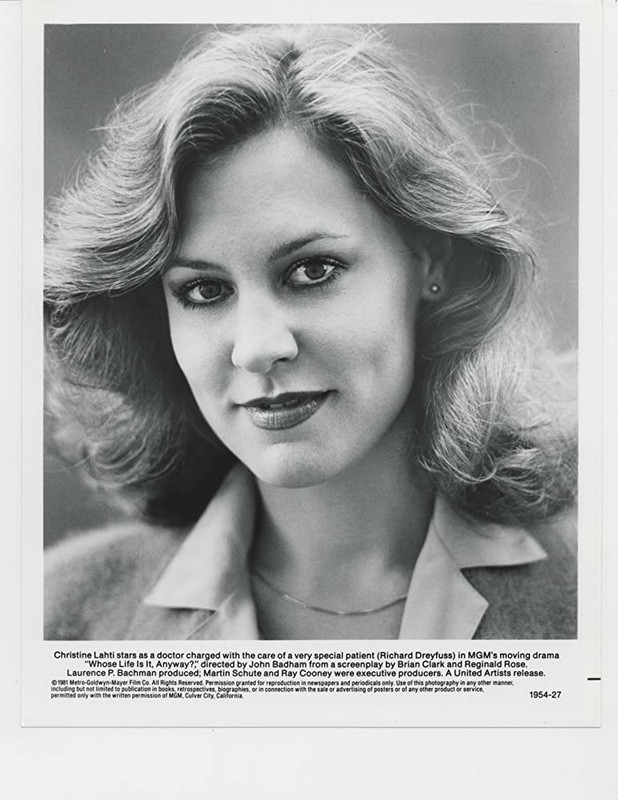
    For now, I want to colorize just 1 particular B&W photo, the following 1981 headshot of actress Christine Lahti from the Richard Dreyfuss drama movie "Whose Life Is It Anyway?" -
    https://i.postimg.cc/mDd0vr1N/Lahti-Christine-34.jpg
    Is it even possible to somehow get a kind someone to colorize just this 1 particular photo for me, either for free or just a very small fee? So far I've already tried several "highly-recommended" free software programs on the 'Net, but have been frustrated so far because it seems that all of them are either too complicated to use (for advanced users rather than beginners) or all they seem to do is tint the photo slightly in a hue that's almost the same as either her facial skin or her hair color. I don't know what color her lipstick/lips are supposed to be, but at least I know that her eyes are supposed to be either hazel or brown.
    Any help whatsoever would be very much appreciated - THANKS!
    --- Synchronet 3.20a-Win32 NewsLink 1.114
  • From Paul@nospam@needed.invalid to alt.computer on Tue Jun 21 12:56:05 2022
    On 6/21/2022 9:05 AM, Lee wrote:
    Hi -

    Anyone know either of the following? -

    1. How to colorize a B&W photo in Corel Photo-Paint, Version 7.0?

    2. How to colorize a B&W photo in any decent, free or very inexpensive colorizing software program that's simple to use, such that it may even do it automatically for the user with very few, simple steps or processes?

    For now, I want to colorize just 1 particular B&W photo, the following 1981 headshot of actress Christine Lahti from the Richard Dreyfuss drama movie "Whose Life Is It Anyway?" -

    https://i.postimg.cc/mDd0vr1N/Lahti-Christine-34.jpg

    Is it even possible to somehow get a kind someone to colorize just this 1 particular photo for me, either for free or just a very small fee? So far I've already tried several "highly-recommended" free software programs on the 'Net, but have been frustrated so far because it seems that all of them are either too complicated to use (for advanced users rather than beginners) or all they seem to do is tint the photo slightly in a hue that's almost the same as either her facial skin or her hair color. I don't know what color her lipstick/lips are supposed to be, but at least I know that her eyes are supposed to be either hazel or brown.

    Any help whatsoever would be very much appreciated - THANKS!


    I've seen two university-type projects for colorizing.

    One program was so crude, it required the operator to pick "key points"
    and select colors for the key points. Which, as it turns out, is a lot
    of work.

    The second (also using neural networks), could assign colors itself,
    based on training on a large number of photos.

    The normal test for these tools is "feathered parrot in rain forest",
    and it will select purple or green for the parrot, it gets the green
    leaves mostly correct.

    But both of them suffer from the same problem. Namely, they cannot
    "paint within the lines". There tends to be a bit of "overspray
    around the edges" of objects.

    This makes the results tantalizingly close, but "not right". It's
    just not production grade workmanship. And if you had to fix
    the issues by hand, why... you might as well colorize it by hand.

    sudo apt install python3-pip

    pip install autocolorize

    sudo apt install caffe-cpu # not in Ubuntu 2204, but still in Ubuntu 2004.
    # The caffe-cuda appears to be out of support,
    # which is not a deal-breaker unless you are
    # training neural-network designs. This is why it
    # takes four minutes - it's CPU based.

    /home/bullwinkle/.local/bin/autocolorize -d cpu BW.jpg -o CLR.jpg
    "Downloading weights file" [maybe 500MB worth][700KB/sec][cached for next time]

    It doesn't use multiple CPU cores, which is... odd.
    Start time 11:40AM. RAM usage 17.7GB so far (on a 64GB machine). Finish at 11:44AM.
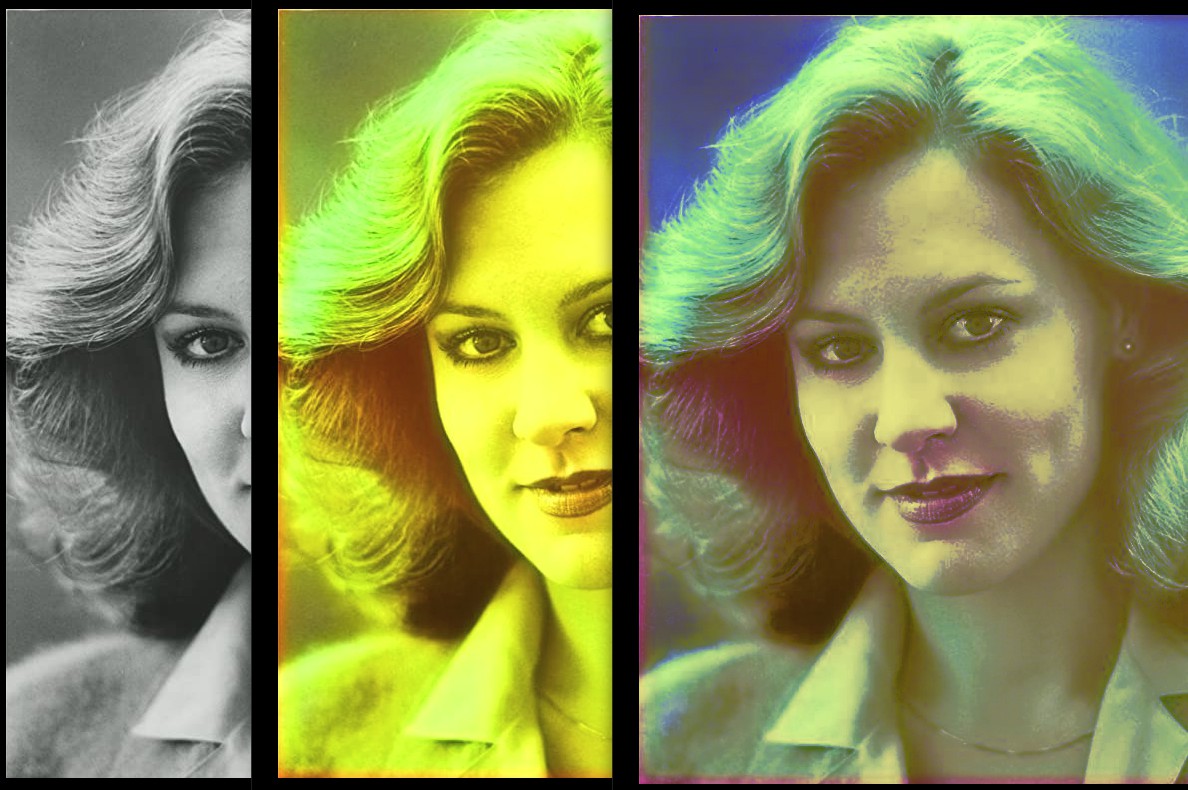
    Considering the amount of time this is taking, she'll have green lipstick.

    And that was an amazingly prescient guess on my part,
    as the program did NOT colorize the image and just
    turned the entire image a tint of green. Bad monkey! Bad!

    [Picture]

    https://i.postimg.cc/rpKhmQCq/test-and-fix-attempt.jpg

    The left image is the original.
    The middle image is the colorization output.
    The right hand image, is rotating the color dials in GIMP
    and "doing the best you can" sorta.

    Oh well.

    Paul

    --- Synchronet 3.20a-Win32 NewsLink 1.114
  • From Lee@DLee122298@aol.com to alt.computer on Thu Jun 23 07:32:22 2022
    THANKS very much, Paul. Someone on another forum kindly did the following for me, which seems to be much better than anything I could ever do, except for the eye color being incorrect, as I did mention before that Christine's eyes are supposed to be either hazel or brown -
    https://i.postimg.cc/05B6pwn9/Lahti-Christine-34d.jpg
    So now all I have to do is just correct the eye color to brown or hazel, but I could very well screw it up badly & make it even worse. If anyone out there would be kind enough to be willing to give it a shot, it would be tremendously appreciated, but if not, then I'm still very thankful/grateful already anyway for the efforts. THANKS again!
    --- Synchronet 3.20a-Win32 NewsLink 1.114
  • From Paul@nospam@needed.invalid to alt.computer on Thu Jun 23 11:15:46 2022
    On 6/23/2022 10:32 AM, Lee wrote:
    THANKS very much, Paul. Someone on another forum kindly did the following for me, which seems to be much better than anything I could ever do, except for the eye color being incorrect, as I did mention before that Christine's eyes are supposed to be either hazel or brown -

    https://i.postimg.cc/05B6pwn9/Lahti-Christine-34d.jpg

    So now all I have to do is just correct the eye color to brown or hazel, but I could very well screw it up badly & make it even worse. If anyone out there would be kind enough to be willing to give it a shot, it would be tremendously appreciated, but if not, then I'm still very thankful/grateful already anyway for the efforts. THANKS again!


    There's something about the skin tone that isn't
    right there. It almost looks like in addition to
    running a colorize, they may have touched up the
    odd spot. It's always possible for a commercial
    filter to have a multitude of approaches in the
    one filter (like maybe a Photoshop filter) and
    end up with such a result.

    I don't know anything about layers and paths in
    photo editors, so I don't think I can modify the
    image to any satisfactory result. You can kinda
    bucket fill patches of the image, but that doesn't
    look absolutely the best either.

    You really have to follow the tool tutorials, to
    operate the tool properly for the job you have
    in mind.

    My level of skill with photo editors is "crop n' scale"
    and that's about it. I couldn't color correct something
    if my life depended on it.

    Paul
    --- Synchronet 3.20a-Win32 NewsLink 1.114
  • From Lee@DLee122298@aol.com to alt.computer on Sat Jun 25 07:31:43 2022
    On Thursday, June 23, 2022 at 11:15:49 AM UTC-4, Paul wrote:

    My level of skill with photo editors is "crop n' scale"
    and that's about it. I couldn't color correct something
    if my life depended on it.

    That's OK. I very much appreciate your efforts - thanks again.
    --- Synchronet 3.20a-Win32 NewsLink 1.114