On 7/29/2023 12:39 AM, Lee wrote:
In File Explorer of Windows 10, I’m trying to do a file search of my
Dell PC’s hard-drive for a file with a certain word in it, but when I
go to type the word in the search box in the upper right of my screen,
it won’t allow me to type anything! Why the hell not?! What good does
it do to display the search box if I’m not allowed to do anything in it?! How the hell can I get the search box in File Explorer to work for me again? What could have possibly caused it to stop working?
Also, the last several consecutive nights, every time I’m on a certain news website, I suddenly get rudely interrupted, usually by a McAfee anti-virus warning, or sometimes I somehow end up forced onto Yahoo News site.
How can I stop this from happening each & every night? I had already
let my McAfee Internet security software expire a couple years ago, as I find that Microsoft’s Internet security software is good enough for my Dell PC, so then I tried uninstalling McAfee from my PC entirely, but the rude interruptions keep persisting, which is so annoying to me personally because it takes over my whole web browser and thus causes the news website to refresh
when I click to go back to it, and I DON’T want it to get refreshed at all!
How the hell can I STOP such rude interruptions by McAfee & Yahoo?!
Any attempts or efforts to help me with these 2 very annoying problems
would be tremendously appreciated – THANKS very much!
After you use Programs and Features to remove McAfee, there
can be a cleaner product they also offer, to remove the last bits of it.
https://www.mcafee.com/support/?articleId=TS101331&page=shell&shell=article-view
"You must only use the MCPR tool if the Windows removal methods shown above don't work."
https://www.majorgeeks.com/files/details/mcafee_consumer_product_removal_tool.html
"McAfee Consumer Product Removal Tool is designed
for the complete removal of McAfee Security products"
Since your license key is expired, there is nothing of value to lose now.
*******
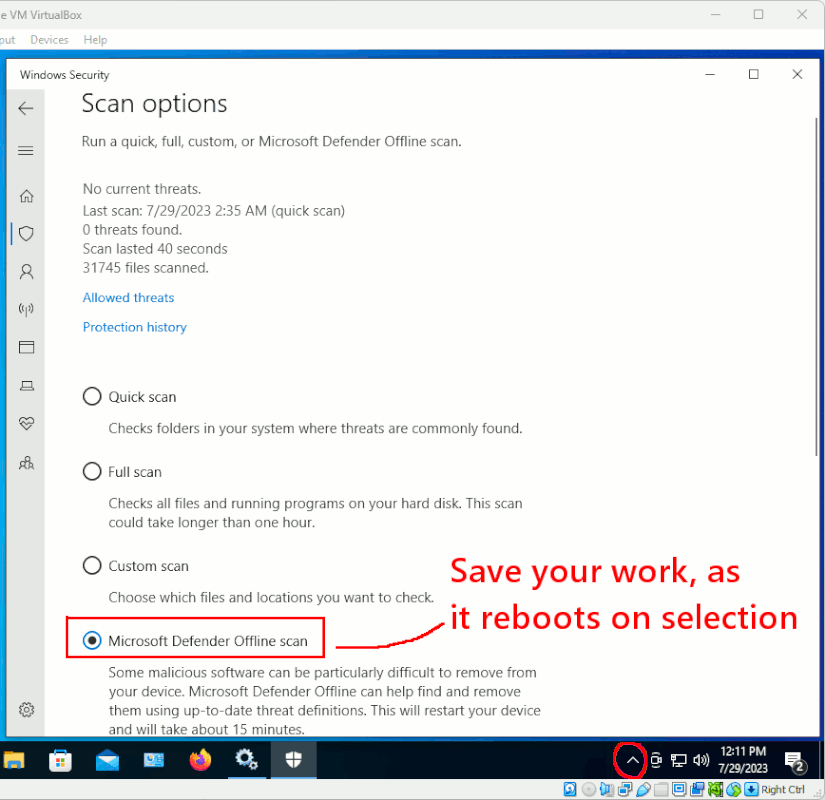
Once Windows Defender is in control, it has an offline scan setting.
[Picture]
https://i.postimg.cc/4N3VBZRh/Win10-offline-scan-option.gif
During the offline scan, the computer reboots into a separate OS from
the C: drive OS (WinRE.wim from the System Reserved partition), and
it does a scan of the C: drive. This is not a thorough scan, and it
tends to concentrate on the core of the C: partition, and not on
scanning your Downloads folder (which would take a lot longer).
Exactly what this will detect, is unknown. But, it's what is
provided for the purpose. I don't know if it will remove
your browser adware.
*******
ADWCleaner is for browser adware. Once you're rebooted into the
regular C: partition, after that offline scan, presumably at this
point you're in control enough of the machine, to tend to your
browsers.
https://www.malwarebytes.com/adwcleaner
*******
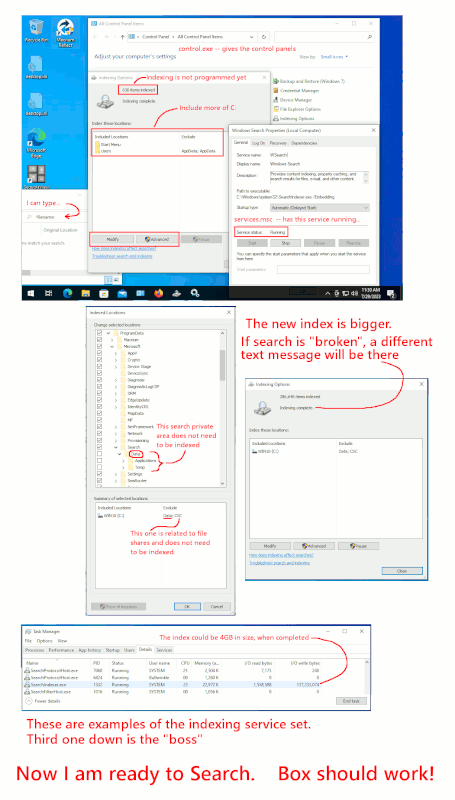
windows Federated Search, is a kind of "Royal Pig". It has moving parts.
If the moving parts are broken, you get the symptom you are seeing. You
cannot type in the box, until the search service or the searchApp are running.
When the computer is received from Dell, it's not really ready for search.
The thing is, the default indexed area, does not include enough
of the C: drive.
The tool can only "see" content, for file types which have a provider.
A file ending in ".txt" for example, you could plainly see that
is a simple case, and the provider would be NULL and not really have
a function. You just suck the text out of the .txt file and index it.
That text can then be obtained in a "content" search.
However, if you had email stored inside an SQLITE file, the indexer
cannot read SQLITE. A "provider", does the translation, and helps
suck the text out of the emails so it can be indexed.
I don't want to leave the impression the indexer "sees everything".
It does see some useful stuff.
[Picture]
https://i.postimg.cc/1txSWDCY/win10-search-indexer-ready-now.gif
On a large setup, it took me *weeks* before the behavior of that
stupid indexer settled down. Now, I have around 1 million files in
the index. Sometimes a search completes in a minute. Sometimes it
takes longer. For the indexer to start from scratch and rebuild
the 4GB file, it can take "all day". A very long day. To finish.
*******
search language -- what you type in the box
If you type a bare word, it does both a Content and a Filename search.
This produces giant quantities of garbage results.
jabberwockie # matches jabberwockie.txt or an email with the word in it
If you use these directives, it stops doing Content searches. Very useful.
filename:Notepad ext:exe # Only matches on "notepad.exe" file.
List all my movie ISO files.
ext:iso size:gigantic # Finds every ISO9660 file of 100MB size or larger.
# Would not match on small files.
You could also try something like this. Experiment and see.
ext:txt content:"dental work"
Paul
--- Synchronet 3.20a-Win32 NewsLink 1.114