That is what i would like to do.
So i find in dummies.com purported instructions supposedly for Win7 (that is what the page said).
Well, the instructions after a few steps become impossible because
the words, wording, even intent does not exist.
Noodle around, find "action center" mumbles about restore there.
Useless; ONLY restore - absolutely no save or make or create.
If one cannot (easily) create a restore point, then one cannot
possibly use something that does not exist.
FANTASY: "restore points".
ThanksI take it that, for Win7, "restore points" are pure fantasy then.
Robert Baer wrote:
That is what i would like to do.I take it that, for Win7, "restore points" are pure fantasy then.
So i find in dummies.com purported instructions supposedly for
Win7 (that is what the page said).
Well, the instructions after a few steps become impossible because
the words, wording, even intent does not exist.
Noodle around, find "action center" mumbles about restore there.
Useless; ONLY restore - absolutely no save or make or create.
If one cannot (easily) create a restore point, then one cannot
possibly use something that does not exist.
FANTASY: "restore points".
Thanks
Robert Baer wrote:
á That is what i would like to do.I take it that, for Win7, "restore points" are pure fantasy then.
á So i find in dummies.comá purported instructions supposedly for Win7
(that is what the page said).
á Well, the instructions after a few steps become impossible because
the words, wording, even intent does not exist.
á Noodle around, find "action center" mumbles about restore there.
á Useless; ONLY restore - absolutely no save or make or create.
á If one cannot (easily) create a restore point, then one cannot
possibly use something that does not exist.
á FANTASY: "restore points".
áá Thanks
Robert Baer wrote:* Thanks! Will try that.
Robert Baer wrote:
That is what i would like to do.I take it that, for Win7, "restore points" are pure fantasy then.
So i find in dummies.com purported instructions supposedly for
Win7 (that is what the page said).
Well, the instructions after a few steps become impossible because >>> the words, wording, even intent does not exist.
Noodle around, find "action center" mumbles about restore there.
Useless; ONLY restore - absolutely no save or make or create.
If one cannot (easily) create a restore point, then one cannot
possibly use something that does not exist.
FANTASY: "restore points".
Thanks
https://www.techspot.com/downloads/6178-restore-point-creator.html
That's if you wanted to script it or something.* Not really. Firstly one must view by small icons; the smaller the
*******
The System Control panel should have a button somewhere
to create a restore point too.
Paul
On Tue, 6 Oct 2020 12:41:20 -0700, Robert Baer wrote:* Absolutely nothing happens.
Robert Baer wrote:
That is what i would like to do.I take it that, for Win7, "restore points" are pure fantasy then.
So i find in dummies.com purported instructions supposedly for Win7 >>> (that is what the page said).
Well, the instructions after a few steps become impossible because
the words, wording, even intent does not exist.
Noodle around, find "action center" mumbles about restore there.
Useless; ONLY restore - absolutely no save or make or create.
If one cannot (easily) create a restore point, then one cannot
possibly use something that does not exist.
FANTASY: "restore points".
Thanks
Press Win+PrintScreen.
Click on "Advanced system setting" link on left side. It'll show a dialog. Switch to the "System Protection" tab on the dialog.* So.. i tried the following:
Press the "Create" button.
The button is disabled if none of the harddisk has enabled protection.
Or create it from the Command Prompt, batch file, or program shortcut file. e.g. (note: one line command)
wmic /namespace:\\root\default path systemrestore call createrestorepoint "my savepoint",100,16* The BAT file took a while; so something useful? may have happened
BTW, if i use one of them, do i lose newer HD data?
Robert Baer wrote:
BTW, if i use one of them, do i lose newer HD data?
That varies with the OS you're using it on.
You know how dangerous the WinXP one is already.
It used to preserve content in My Documents just
fine. But if you were an independent thinker and
made folders like C:\MyBusinessData , it would
trash stuff in that "unblessed" folder.
Later OSes do a better job, but you need to look
that up and verify it. You can't take chances on
important data.
Paul
JJ wrote:
* Absolutely nothing happens.
Press Win+PrintScreen.
* The BAT file took a while; so something useful? may have happened
while it was plotting to overtake Colossus.
Amazingly, i found two restore points:
10/7/2020 11:28:09 PM my savepoint Manual
10/7/2020 4:16:21 PM Automatic Restore Point System
The second one is suspicious; maybe Win7 sensed earlier that i was
going to do something definitive.
They are the only 2 in existence for Win7 in 1 year of use.
If i include Win2K and WinXP, i could add maybe 3 system restore
points over a 15 year period; did not know how to create them.
What are those funny numbers (100 and 16) for?
BTW, if i use one of them, do i lose newer HD data?
On Wed, 7 Oct 2020 23:48:35 -0700, Robert Baer wrote:
JJ wrote:
* Absolutely nothing happens.
Press Win+PrintScreen.
That's Windows' built in keyboard shortcut. If it doesn't work, something else is wrong, or is interfering.
* The BAT file took a while; so something useful? may have happened
while it was plotting to overtake Colossus.
It gathers changed data since previous restore point.
Amazingly, i found two restore points:
10/7/2020 11:28:09 PM my savepoint Manual
10/7/2020 4:16:21 PM Automatic Restore Point System
The second one is suspicious; maybe Win7 sensed earlier that i was
going to do something definitive.
They are the only 2 in existence for Win7 in 1 year of use.
If i include Win2K and WinXP, i could add maybe 3 system restore
points over a 15 year period; did not know how to create them.
That's because the System Protection was previously disabled, and it was enabled only recently. Win7 creates automatic restore point when the there's none, or previous restore point is 7 days old. In Vista, it's 24 hours old. In XP, it's every 24 hours regardless of any previous restore point. Action based restore point will also be created when a predefined program EXE is executed (e.g. setup.exe, install.exe, etc.).
What are those funny numbers (100 and 16) for?
One is the data type. The other is the type of the event. Both give hints of what data to look for changes, and to prepare the restore point for the next one.
BTW, if i use one of them, do i lose newer HD data?
I'm not entirely sure myself. What I know is that, the Windows registry
data, and program files are affected by the restoration process. Regardless of whether they're bad or good data/files.
On Tue, 6 Oct 2020 12:41:20 -0700, Robert Baer wrote:* The <windows icon><PrtSc> combo does nothing.
Robert Baer wrote:
That is what i would like to do.I take it that, for Win7, "restore points" are pure fantasy then.
So i find in dummies.com purported instructions supposedly for Win7 >>> (that is what the page said).
Well, the instructions after a few steps become impossible because
the words, wording, even intent does not exist.
Noodle around, find "action center" mumbles about restore there.
Useless; ONLY restore - absolutely no save or make or create.
If one cannot (easily) create a restore point, then one cannot
possibly use something that does not exist.
FANTASY: "restore points".
Thanks
Press Win+PrintScreen.
Click on "Advanced system setting" link on left side. It'll show a dialog. Switch to the "System Protection" tab on the dialog.* How does one tell/find out? And change it
Press the "Create" button.
The button is disabled if none of the harddisk has enabled protection.
Or create it from the Command Prompt, batch file, or program shortcut file. e.g. (note: one line command)* Made a batch file with above command line; ran it.
wmic /namespace:\\root\default path systemrestore call createrestorepoint "my savepoint",100,16
JJ wrote:
On Tue, 6 Oct 2020 12:41:20 -0700, Robert Baer wrote:* The <windows icon><PrtSc> combo does nothing.
Robert Baer wrote:
That is what i would like to do.I take it that, for Win7, "restore points" are pure fantasy then.
So i find in dummies.com purported instructions supposedly for Win7
(that is what the page said).
Well, the instructions after a few steps become impossible because >>>> the words, wording, even intent does not exist.
Noodle around, find "action center" mumbles about restore there. >>>> Useless; ONLY restore - absolutely no save or make or create.
If one cannot (easily) create a restore point, then one cannot
possibly use something that does not exist.
FANTASY: "restore points".
Thanks
Press Win+PrintScreen.
Click on "Advanced system setting" link on left side. It'll show a dialog. >> Switch to the "System Protection" tab on the dialog.* How does one tell/find out? And change it
Press the "Create" button.
The button is disabled if none of the harddisk has enabled protection.
* Made a batch file with above command line; ran it.
Or create it from the Command Prompt, batch file, or program shortcut file. >> e.g. (note: one line command)
wmic /namespace:\\root\default path systemrestore call createrestorepoint "my savepoint",100,16
Did nothing that i could see/find.
So i went into the control panel and found bushwah concerning restore points and tried making one.
Did nothing that i could see/find.
But i did see some restore points the system made, related to program deletion.
So now what? Purposely do something nasty like deleting a
fake program on purpose to force system to make a restore point
Thanks
On 1/16/2022 7:44 PM, Robert Baer wrote:
JJ wrote:
On Tue, 6 Oct 2020 12:41:20 -0700, Robert Baer wrote:* The <windows icon><PrtSc> combo does nothing.
Robert Baer wrote:Press Win+PrintScreen.
That is what i would like to do.I take it that, for Win7, "restore points" are pure fantasy then. >>>
So i find in dummies.com purported instructions supposedly for >>>>> Win7
(that is what the page said).
Well, the instructions after a few steps become impossible because >>>>> the words, wording, even intent does not exist.
Noodle around, find "action center" mumbles about restore there. >>>>> Useless; ONLY restore - absolutely no save or make or create.
If one cannot (easily) create a restore point, then one cannot >>>>> possibly use something that does not exist.
FANTASY: "restore points".
Thanks
Click on "Advanced system setting" link on left side. It'll show a* How does one tell/find out? And change it
dialog.
Switch to the "System Protection" tab on the dialog.
Press the "Create" button.
The button is disabled if none of the harddisk has enabled protection.
* Made a batch file with above command line; ran it.
Or create it from the Command Prompt, batch file, or program shortcut
file.
e.g. (note: one line command)
wmic /namespace:\\root\default path systemrestore call
createrestorepoint "my savepoint",100,16
Did nothing that i could see/find.
So i went into the control panel and found bushwah concerning
restore points and tried making one.
Did nothing that i could see/find.
But i did see some restore points the system made, related to
program deletion.
So now what? Purposely do something nasty like deleting a fake
program on purpose to force system to make a restore point
Thanks
I would do a pump fake and drive for the net.
Nobody expects you to do that.
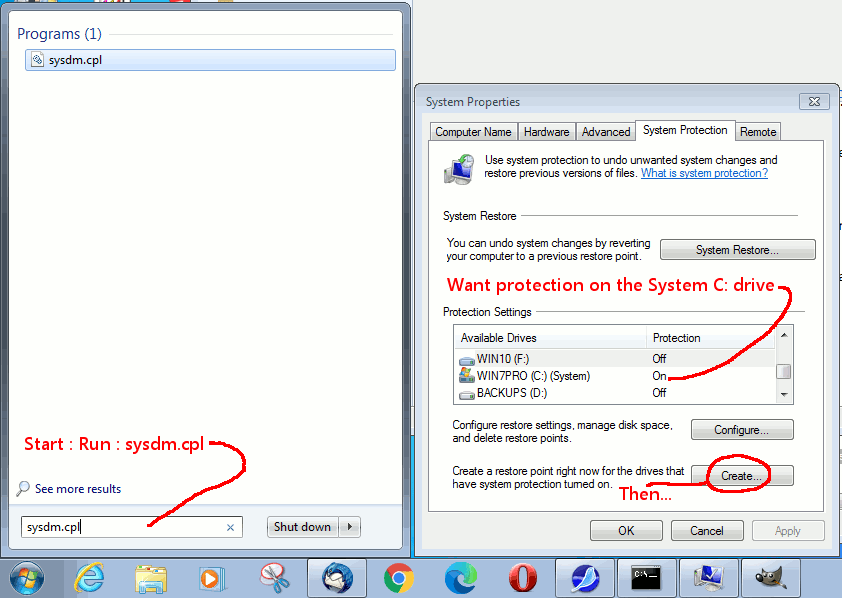
[Picture] right-click empty picture frame and select Reload or such...
https://i.postimg.cc/yxRTLFKJ/create-sys-restore-point.gif
Start : Run : sysdm.cpl is the System Control Panel (fastest way in Win10)
Paul
| Sysop: | Gargoyle |
|---|---|
| Location: | Wayne, OK |
| Users: | 9 |
| Nodes: | 10 (0 / 10) |
| Uptime: | 148:20:38 |
| Calls: | 135 |
| Calls today: | 1 |
| Files: | 309 |
| Messages: | 78,952 |
| Posted today: | 1 |